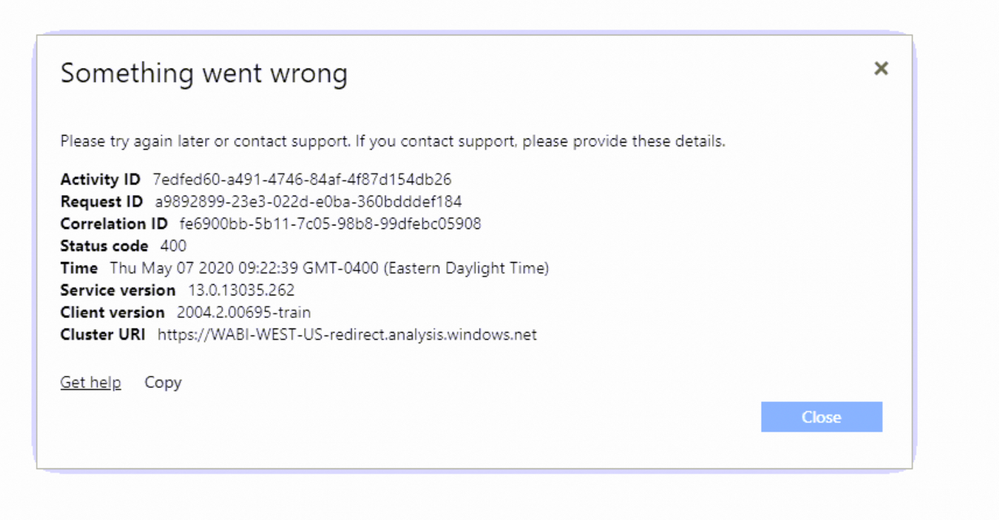
I am attempting to embed a paginated report and getting a status 400 error. The report never loads.
My code looks like:
function LoadReport(){
                var models = window['powerbi-client'].models;

                var format = getUrlParam('format','PDF');
                var  tokenType = models.TokenType.Aad; //for 403 errors, change this to Embed
                // You can find more information at https://github.com/Microsoft/PowerBI-JavaScript/wiki/Embed-Configuration-Details.
                var config = {
                   type:'report',tokenType:tokenType, accessToken: 'the token', embedUrl: 'https://app.powerbi.com/rdlEmbed?reportId=08dfff6f-5c6b-450c-af76-e910ca69f92e&config=eyJjbHVzdGVyVXJsIjoiaHR0cHM6Ly9XQUJJLVVTLUVBU1QyLXJlZGlyZWN0LmFuYWx5c2lzLndpbmRvd3MubmV0IiwiZW1iZWRGZWF0dXJlcyI6eyJtb2Rlcm5FbWJlZCI6ZmFsc2V9fQ%3d%3d&rp:SpecialtyName=Cardiovascular&rp:HospitalName=220031', id:'08dfff6f-5c6b-450c-af76-e910ca69f92e',permissions: models.Permissions.View
                };

                // Get a reference to the paginated embedded report HTML element
                var paginatedReportContainer = $('#paginatedReportContainer')[0];

                // Embed the paginated report and display it within the div container.
                var report = powerbi.embed(paginatedReportContainer, config);
            }
This returns the attached error in the browser.