cancel
Showing results for 
Search instead for 
Did you mean: 

Learn from the best! Meet the four finalists headed to the FINALS of the Power BI Dataviz World Championships! Register now

Reply
Anonymous
Not applicable

On-Prem Gateway Monitoring

Hello guys,


I would like to be able to monitor the gateway and have used this manual to do so. https://docs.microsoft.com/en-us/data-integration/gateway/service-gateway-performance 

Although I have changed everything in the config file, the log files are not created.

Any idea what this might be due to? Is additional info needed?


The gateway is installed on an AWS EC2. 


Please let me know.


Kind regards,


**bleep**

5 REPLIES 5
Greg_Deckler
Community Champion
Community Champion

@Anonymous - I am assuming that you have restarted/rebooted it after config changes?


I think it bleeped your name!! LOL!!


Follow on LinkedIn
@ me in replies or I'll lose your thread!!!
Instead of a Kudo, please vote for this idea
Become an expert!: Enterprise DNA
External Tools: MSHGQM
YouTube Channel!: Microsoft Hates Greg
Latest book!:
DAX For Humans

DAX is easy, CALCULATE makes DAX hard...
Anonymous
Not applicable

hahaha true 😛 

Always that nice name 

But yes, I have restarted the gateway

Well, I would check the event log to see if you are getting any errors or warnings from the gateway service. I would make sure that the service account running the gateway has permissions to the report directory. Other than that, if you are following everything to the letter you will probably need to talk to support. You could check the Issues forum here:

https://community.powerbi.com/t5/Issues/idb-p/Issues

And if it is not there, then you could post it.

If you have Pro account you could try to open a support ticket. If you have a Pro account it is free. Go to https://support.powerbi.com. Scroll down and click "CREATE SUPPORT TICKET".


Follow on LinkedIn
@ me in replies or I'll lose your thread!!!
Instead of a Kudo, please vote for this idea
Become an expert!: Enterprise DNA
External Tools: MSHGQM
YouTube Channel!: Microsoft Hates Greg
Latest book!:
DAX For Humans

DAX is easy, CALCULATE makes DAX hard...
Anonymous
Not applicable

Thanks for your help. I will take a look at the event log if there are some warnings. And if not, as a Pro user I will create a ticket 🙂

So thanks again.


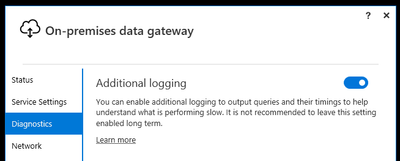
Keep in mind there are multiple ways to increase gateway logging.  One way is to flip the switch in the Gateway Configurator app

lbendlin_0-1598453962390.png


Another way is to manually modify the appropriate .config files in the gateway install folder. Depending on what you want to measure that will impact different files.


Make very sure that your gateway machine has both the disk space and the processing power to handle the additional logging. This is a very costly endeavor, and should only be used if you're really desperate.


Helpful resources

Announcements
Power BI DataViz World Championships carousel

Power BI DataViz World Championships - June 2026

A new Power BI DataViz World Championship is coming this June! Don't miss out on submitting your entry.

Join our Fabric User Panel

Join our Fabric User Panel

Share feedback directly with Fabric product managers, participate in targeted research studies and influence the Fabric roadmap.

March Power BI Update Carousel

Power BI Community Update - March 2026

Check out the March 2026 Power BI update to learn about new features.