How many rows are sampled in the 'dataset' preloaded object for R and Python visual objects? I have about 2 million rows in my dataset
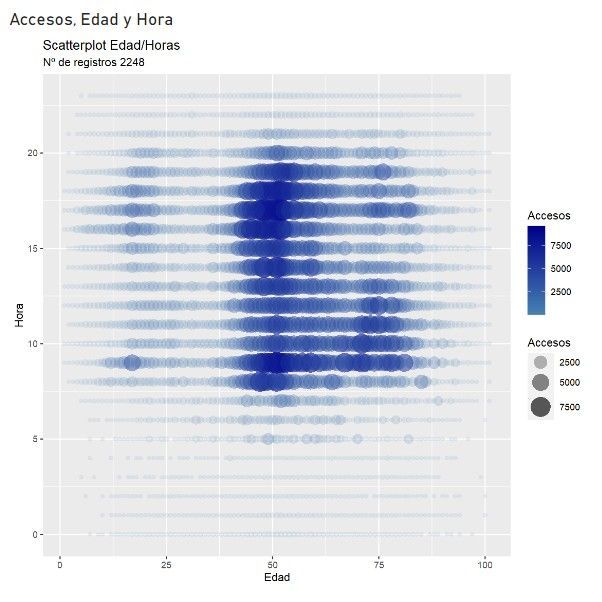
If I insert a ggscatterplot as a R visual object in PowerBI, the number of rows used in my case is 2248,
This is the R Code:
library(ggplot2)

color_palette <- colorRampPalette(c("steelblue", "darkblue"))(length(dataset$Accesos))

ggplot(dataset, aes(x = Edad, y = Hora, size = Accesos, alpha = Accesos, color = Accesos)) +
  geom_point(stroke = NA) +
  scale_size_continuous(range = c(2, 10)) +
  scale_alpha_continuous(range = c(0.1, 0.8)) +
  scale_color_gradientn(colors = color_palette) +
  labs(
      x = "Edad", y = "Hora",
      title = "Scatterplot Edad/Horas",
      subtitle = paste("Nº de registros", nrow(dataset)))
And this is the R visual object result:
But, if I try to insert a python seaborn density plot as a Python visual object...
The source:
import pandas as pd
import numpy as np
import seaborn as sns
import matplotlib.pyplot as plt

num_filas = len(dataset)

sns.set(style="white")

sns.kdeplot(data=dataset, x='Hora', y='Edad', fill=True, cmap='viridis', thresh=0, levels=100)

plt.xlabel('Hora')
plt.ylabel('Edad')

plt.title("Grafico de densidad horas-Edad")
plt.suptitle(f"Número de Filas: {num_filas}", y=0.95)

plt.show()
The rows included in dataset are just... 24! And, of course, nothing to plot...
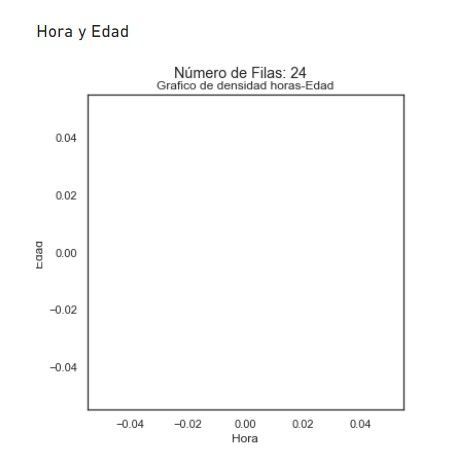
It should look like this (same code, in Google Collab)
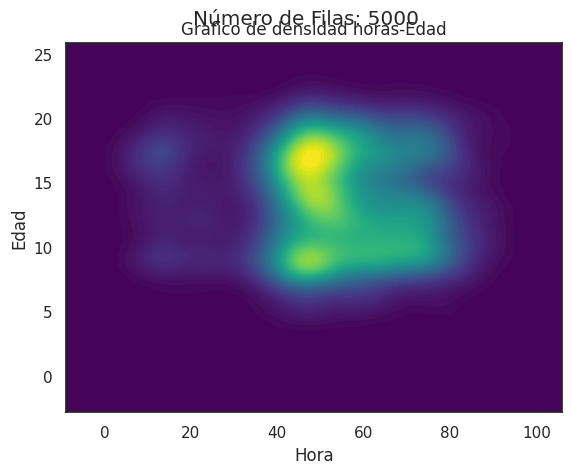
Is there someting wrong in my code?
Thanks!


