This is best Fabric, Power BI, SQL and AI community event. How do we know? The last event sold out! Save €200 with code FABCMTY200.
Register nowThe Fabric community is now in read-only for platform upgrade. Learn more
I am trying to create an example of a streaming dashboard in Power BI using a javascript random number generator with a date stamp. I have created the Javascript to get the values I need, but I don't know how to use the URL or cURL or Powershell to publish the fake data my Javascript is producing. Any help would be greatly appreciated.
Solved! Go to Solution.
Hi @Anonymous,
Do you store the values somewhere? If not, I would suggest you use JS to push the data into Power BI. Please refer to the demo below.
1. Install Node.js.
2. Install the module "request".
3. Try the code below.
var request = require('request');
// the URL of Power BI streaming dataset.
var target_url = "https://api.powerbi.com/beta/*************************g%3D%3D"
// the data to push. It should be the values generated by JS to you.
var raw_data = {'ID': 1999, 'Name': "Jack"}
// convert a object to JSON.
var data_to_post = JSON.stringify(raw_data)
const req = request.post(target_url, data_to_post, (error, res, body) => {
console.log(`Status code: ${res.statusCode}`);
});
req.on('error', (e) => {
console.log("error: " + e.message);
});
req.write(data_to_post);
req.end;
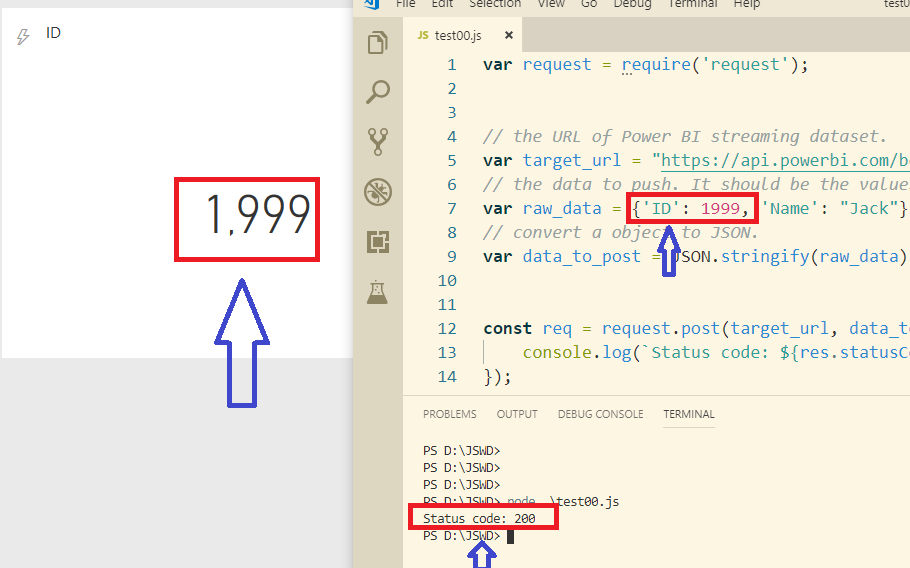
Best Regards,
Hi @Anonymous,
Do you store the values somewhere? If not, I would suggest you use JS to push the data into Power BI. Please refer to the demo below.
1. Install Node.js.
2. Install the module "request".
3. Try the code below.
var request = require('request');
// the URL of Power BI streaming dataset.
var target_url = "https://api.powerbi.com/beta/*************************g%3D%3D"
// the data to push. It should be the values generated by JS to you.
var raw_data = {'ID': 1999, 'Name': "Jack"}
// convert a object to JSON.
var data_to_post = JSON.stringify(raw_data)
const req = request.post(target_url, data_to_post, (error, res, body) => {
console.log(`Status code: ${res.statusCode}`);
});
req.on('error', (e) => {
console.log("error: " + e.message);
});
req.write(data_to_post);
req.end;
Best Regards,
Join us in Barcelona for FabCon and SQLCon, the Fabric, Power BI, SQL, and AI community event. Save €200 with code FABCMTY200.
| User | Count |
|---|---|
| 2 | |
| 1 | |
| 1 | |
| 1 | |
| 1 |
| User | Count |
|---|---|
| 1 | |
| 1 | |
| 1 | |
| 1 | |
| 1 |