Hi all,
I'm currently working on my line chart project with pbi custom visual. Then I stumble upon some problem with customizable line color.
I add color option like this in capabilities.json
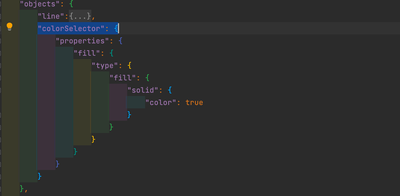
and update options according to the data with getFormattingModel()
public getFormattingModel(): powerbiVisualsApi.visuals.FormattingModel {
        const colorSelectorCard: powerbi.visuals.FormattingCard = {
            displayName: "Data Colors",
            uid: "dataColorsCard_uid",
            groups: [
                {
                displayName: undefined,
                uid: "dataColorsCard_group_uid",

                slices: [],
            }
            ]
        };
        if (this.lineDataPoint.length) {
            this.lineDataPoint.forEach((dataPoint, idx) => {
                (<powerbi.visuals.FormattingGroup>colorSelectorCard.groups[0]).slices.push(
                    {
                        uid: `dataColorsCard_group_colorSelector${idx}_uid`,
                        displayName: dataPoint.category,
                        control: {
                            type: powerbi.visuals.FormattingComponent.ColorPicker,
                            properties: {
                                descriptor: {
                                    objectName: "colorSelector",
                                    propertyName: "fill",
                                    selector: dataViewWildcard.createDataViewWildcardSelector(dataViewWildcard.DataViewWildcardMatchingOption.InstancesAndTotals),
                                    altConstantValueSelector: dataPoint.selectionId.getSelector(),
                                    instanceKind: powerbi.VisualEnumerationInstanceKinds.ConstantOrRule
                                },
                                value: { value: dataPoint.color }
                            }
                        }
                    });
            });

            colorSelectorCard.revertToDefaultDescriptors = [
                {
                    objectName: "colorSelector",
                    propertyName: "fill",
                }
            ];
        }
        return { cards: [ colorSelectorCard ] }
    }
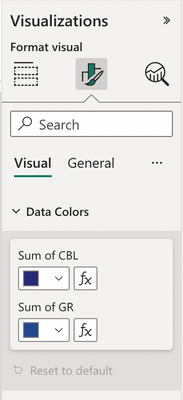
Options is appear and adjustable as expect (I put in 2 line data).
Nevetheless, the output objects from dataViews[0].categorical.categories[0] is appear to be in the length of value in categories instead of number of line data (660 instead of 2).
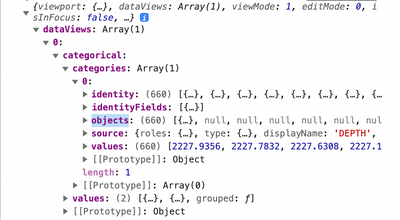
This could probably lead to some bug in the future, so I want some help on how to shape the objects data to be equal to number of input line data not the categories length.
Thanks


