Join us at FabCon Atlanta from March 16 - 20, 2026, for the ultimate Fabric, Power BI, AI and SQL community-led event. Save $200 with code FABCOMM.
Register now!The Power BI Data Visualization World Championships is back! Get ahead of the game and start preparing now! Learn more
Hi All,
I'm trying to create a tool that connects to Baidu Maps API to extract travel time data based on the different modes of transport.
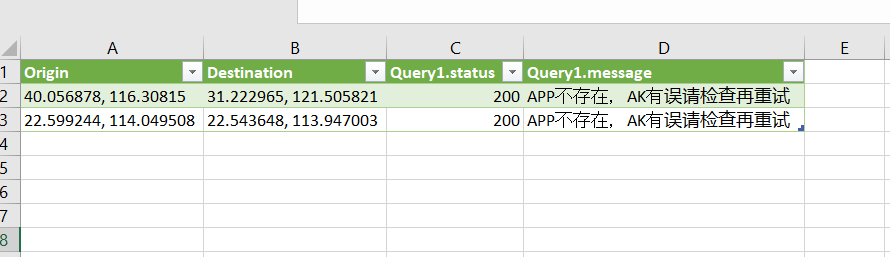
I've successfully manage to create a custom function that allows dynamic changes to Start and End destinations. However, results i get from Baidu maps is that the "App is not present, there is error in the AK" refer to Column D . When i tested the URL link in a blank webpage, it manage to return valid results for the Start and End locations if i typed in manually. However, if i copy the data from the cell into the URL, it gives error (shown below). Appreciate if anyone can enlighten on what went wrong. Thanks.
(Start as text, End as text) =>
let
Baidu_API_key = "API_key",
Distance_lite = Web.Contents("http://api.map.baidu.com/directionlite/v1/driving?origin=Start&destination=End&ak=Baidu_API_key"),
Results = Json.Document(Distance_lite)
in
Results
Solved! Go to Solution.
Hi All,
my colleague helped to solve the above issue. It is crucial for the orign and destination inputs to omit spacing for the api to be connected correctly. Hence, instead of 22.543648, 113.947003 it should be 22.543648,113.947003.
I've made modifications to my query function and its now pulling the same data as what is available on webpage.
(Start as text, End as text) =>
let
Baidu_API_key = "APIkey",
Distance_lite = Web.Contents("http://api.map.baidu.com/directionlite/v1/transit?",
[Query=
[origin=Start,
destination=End,
ak=Baidu_API_key]]),
Results = Json.Document(Distance_lite)
in
ResultsI read the documentation for Baidu Directions Lite API again, it states that the format of origin needs to be Double, Double. (please see documentation here http://lbsyun.baidu.com/index.php?title=webapi/direction-api-v2)
Greatly appreciate if anyone can suggest a solution to pass the query inputs as number instead of string. I haven't figure out a way to pass the parameter as numbers when comma is involved. The example coordinates i've used were origin = 22.599244, 114.049508 | destination = 22.543648, 113.947003
Thank you.
Hi All,
my colleague helped to solve the above issue. It is crucial for the orign and destination inputs to omit spacing for the api to be connected correctly. Hence, instead of 22.543648, 113.947003 it should be 22.543648,113.947003.
The Power BI Data Visualization World Championships is back! Get ahead of the game and start preparing now!
Check out the November 2025 Power BI update to learn about new features.
| User | Count |
|---|---|
| 4 | |
| 2 | |
| 2 | |
| 1 | |
| 1 |
| User | Count |
|---|---|
| 10 | |
| 10 | |
| 4 | |
| 3 | |
| 3 |