Get certified for free when you join Fabric Data Days 2026 and dive into Fabric, Power BI, SQL, AI, and other essential data skills.
Join nowJuly 28 - August 9 | Final Round of the Power BI Dataviz World Championships. This is your chance. Learn more
Hi All,
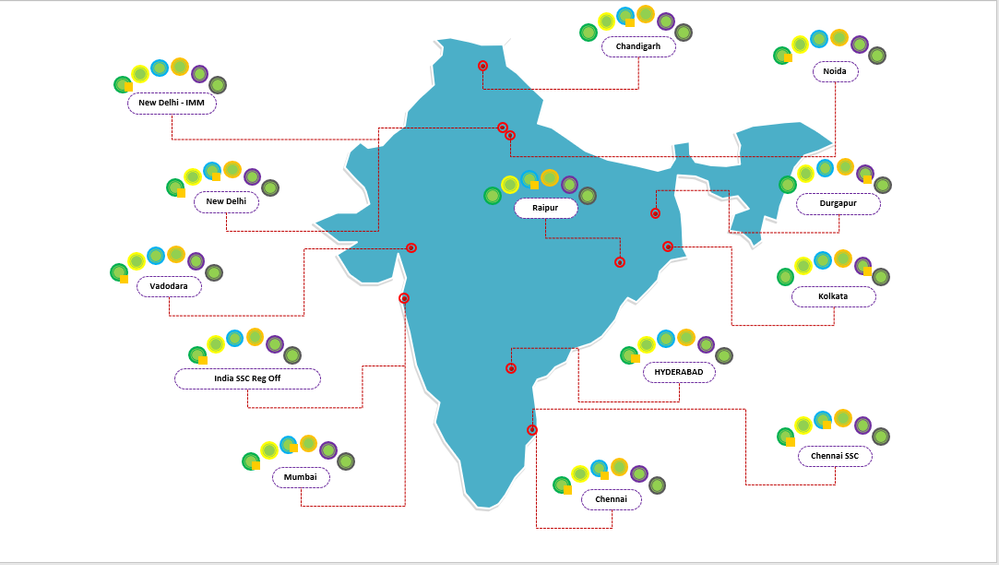
We have a requirement to create a visualization similar to the below one where we can visualize country wise sites health as per there categories.
In the below visual you can see there are 6 circles which denote 6 categories like Application, Security, IDM, etc with colors as Green, Yellow, Blue, Orange, Purple, Black and beside there there is one orange square box which denotes the City-Category wise percentage. So if percentage is >95 it would be Green, 90-95 should be Orange & <90 should be Red.
How do we acheive this Visualization?
You may use PureViz Infographic custom visual for this design I guess. There is a similar map design in sample visuals in this video and it allows you to design visual in Power Point and then use in Power BI.
It is not published on App Source yet, but you can dowload visual from it's website. PureViz Infographic for Power BI
If you love stickers, then you will definitely want to check out our community sticker challenge, Barcelona edition!
Check out the July 2026 Power BI update to learn about new features.
| User | Count |
|---|---|
| 2 | |
| 1 | |
| 1 | |
| 1 | |
| 1 |
| User | Count |
|---|---|
| 4 | |
| 3 | |
| 2 | |
| 1 | |
| 1 |