Join us at FabCon Atlanta from March 16 - 20, 2026, for the ultimate Fabric, Power BI, AI and SQL community-led event. Save $200 with code FABCOMM.
Register now!The Power BI Data Visualization World Championships is back! It's time to submit your entry. Live now!
Hi All,
I have a date format in my report from which i have extraced month to use as a slicer. i have made a calculated column from that extracted month column like below-:
=(if [Report Month]=1 then "January" else
if [Report Month]=2 then "February" else
if [Report Month]=3 then "March" else
if [Report Month]=4 then "April" else
if [Report Month]=5 then "May" else
if [Report Month]=6 then "June" else
if [Report Month]=7 then "July" else
if [Report Month]=8 then "August" else
if [Report Month]=9 then "September" else
if [Report Month]=10 then "October" else
if [Report Month]=11 then "November" else
"December")
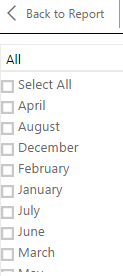
but the slicer is displaying month names like this-:
Can anyone tell how we can dispplay month names as calender type like
Jan
Feb
Mar
April....
and not in alphabetical order?
Regards,
Droid
Solved! Go to Solution.
@Anonymous
You need to create an auxiliary table and relationship as below, then click on the month column and sort it by sequence.
@Anonymous
You need to create an auxiliary table and relationship as below, then click on the month column and sort it by sequence.
The Power BI Data Visualization World Championships is back! It's time to submit your entry.
Check out the January 2026 Power BI update to learn about new features.
| User | Count |
|---|---|
| 4 | |
| 3 | |
| 2 | |
| 1 | |
| 1 |
| User | Count |
|---|---|
| 4 | |
| 4 | |
| 4 | |
| 3 | |
| 2 |