cancel
Showing results for 
Search instead for 
Did you mean: 

Next up in the FabCon + SQLCon recap series: The roadmap for Microsoft SQL and Maximizing Developer experiences in Fabric. All sessions are available on-demand after the live show. Register now

Reply
amatteo90
New Member

Native App for data push with auto login

Hello everyone,

I'm building a console application using Visual Studio 2017 in order to push data into a Power BI dataset. I followed this guide:

Everithing it's working fine but i need to get a token with a non-interactively authentication to Azure AD. In a few words, without GUI on which user select his username. In internet I can't find anything that explains how to do that with a Native App. I only found how to do that with App Web/API using the clientID and secretID, but with Native App I haven't any secretID. Moreover with a App Web/API I got an Unauthorized (401) when I try to create a DataSet.


Someone could please help me to find a solution? Keep in mind that I never want the login screen to appear, so the solution of token stored in the cache is useless for me.


I appreciate any kind of help. Thanks,

amatteo90

6 REPLIES 6
v-jiascu-msft
Microsoft Employee
Microsoft Employee

Hi @amatteo90,


Could you please mark the proper answers as solutions?


Best Regards,

Dale

Community Support Team _ Dale
If this post helps, then please consider Accept it as the solution to help the other members find it more quickly.
v-jiascu-msft
Microsoft Employee
Microsoft Employee

Hi @amatteo90,


How did you try to get the token? Since there are many methods, the process of authentication depends on your code. Please refer to the Python script below, which use a username and a password to get the access token.

We can get the token for both Native App and Web App unless the AAD requires two-factor authentication.

Reference: azure-activedirectory-library-for-python and active-directory/develop/v1-oauth2-implicit-grant-flow.

# adal is azure-activedirectory-library-for-python. install it first.
from adal import AuthenticationContext


# get access token implictly with username and password.
def get_token():
    client_id = "a30***1ae1dcde27e"
    resource_uri = "https://analysis.windows.net/powerbi/api"
    user_name = "d**.com"
    user_password = "password"

    auth_context = AuthenticationContext("https://login.microsoftonline.com/your_tenant_name")
    token_response = auth_context.acquire_token_with_username_password(resource_uri, user_name, user_password, client_id)
    token = "Bearer " + token_response["accessToken"]
    return token


Best Regards,
Dale

Community Support Team _ Dale
If this post helps, then please consider Accept it as the solution to help the other members find it more quickly.

I think your answer is unrelated to the problem of authorization, since it only talks about authentication.
tripleacoder
Helper I
Helper I

Hi,

I'm trying to do the same thing:

https://community.powerbi.com/t5/Developer/Power-Bi-REST-API-401-Authorization-error-when-using-app-...


You can't generate an app key when you have selected Native app type. You have to select Web/API.


This sample shows you how to use the app secret:

https://github.com/azure-samples/active-directory-dotnet-daemon


I get 401 errors when I try to call the REST API though. This is even though my app has been granted permissions by a Global Admin.


Hello,

Thanks for the answer, By using a Web App I haven't any problem to perform a login with no GUI for authentication. However I got a 401 error when I try to call the REST API like you.


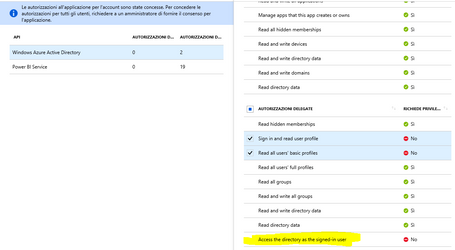
For Power BI Service I've granted any king of delegate authorizations that requires no administrator privileges. However I've a problem to grant the authorization "Access the directory as the signed-in user" even if doesn't require administrator privileges. Maybe is this the problem?


Capture.PNG


I am not sure the Delegated permissions are used at all when authenticating using an app key/service principal...


https://docs.microsoft.com/en-us/azure/active-directory/develop/v1-permissions-and-consent#types-of-...


Types of permissions

Azure AD defines two kinds of permissions:

  • Delegated permissions - Are used by apps that have a signed-in user present. For these apps, either the user or an administrator consents to the permissions that the app requests and the app is delegated permission to act as the signed-in user when making calls to an API. Depending on the API, the user may not be able to consent to the API directly and would instead require an administrator to provide "admin consent".
  • Application permissions - Are used by apps that run without a signed-in user present; for example, apps that run as background services or daemons. Application permissions can only be consented by an administrator because they are typically powerful and allow access to data across user-boundaries, or data that would otherwise be restricted to administrators.

Helpful resources

Announcements
New to Fabric survey Carousel

New to Fabric Survey

If you have recently started exploring Fabric, we'd love to hear how it's going. Your feedback can help with product improvements.

Power BI DataViz World Championships carousel

Power BI DataViz World Championships - June 2026

A new Power BI DataViz World Championship is coming this June! Don't miss out on submitting your entry.

Join our Fabric User Panel

Join our Fabric User Panel

Share feedback directly with Fabric product managers, participate in targeted research studies and influence the Fabric roadmap.

March Power BI Update Carousel

Power BI Community Update - March 2026

Check out the March 2026 Power BI update to learn about new features.