Join us at FabCon Atlanta from March 16 - 20, 2026, for the ultimate Fabric, Power BI, AI and SQL community-led event. Save $200 with code FABCOMM.
Register now!Vote for your favorite vizzies from the Power BI Dataviz World Championship submissions. Vote now!
Does anyone know of a sure way to get data from Monday.com into Power BI?
I’ve tried this Loading GraphQL data (monday.com API v2) into PowerBI · GitHub
However it’s not working returning an error “We found extra characters at the end of JSON input.”
I have yet to identify why its returning this error as its a copy paste of what other use and say works.
Any help or insight would be greatly appreciated.
Thank you!
I'm late to this, but it will hopefully help others.
I have been using Tugger (https://tuggerapp.com/) for a while now. I joined 'em before they even had a Monday connector; what they do is pull (or Tug as they call it) you data into their data warehouse. (It's also nice to see that they are now ISO 27001 certified.) Although, I'm software dev, the subscription they charge is easily worth the development cost.
Once your data is in Tugger's warehouse, they provide secure OData credentials to import into the reporting option of your choice, such as: Power BI, Excel and Tableau.
Trying em out is a no-brainer, IMO, as they offer a free trial.
A reliable way to get data from Monday.com into Power BI is by using Skyvia. It offers a user-friendly platform for integration, bypassing complexities like GraphQL queries and JSON parsing errors. Skyvia can handle data synchronization between Monday.com and Power BI, ensuring a smooth and error-free data transfer.
Hi @FlamingoJoe ,
You can try using Power BI Connector for monday.com
All you have to do is install it, create a data source, and upload it to Power BI.
Power BI Connector for monday.com by DOIT-BI has a 14 day free trial.
Best regards,
DOIT-BI Team
Hi @FlamingoJoe ,
This may be an error occurred when extracting data. Which column does the error appear in? Is it related to a null field?
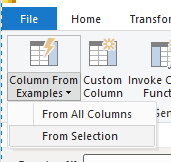
In Power Query Editor, try to select the JSON column and then choose add Column From Examples.
Best Regards,
Liang
If this post helps, then please consider Accept it as the solution to help the other members find it more quickly.
Vote for your favorite vizzies from the Power BI World Championship submissions!
If you love stickers, then you will definitely want to check out our Community Sticker Challenge!
Check out the January 2026 Power BI update to learn about new features.
| User | Count |
|---|---|
| 3 | |
| 2 | |
| 1 | |
| 1 | |
| 1 |
| User | Count |
|---|---|
| 4 | |
| 3 | |
| 3 | |
| 2 | |
| 2 |