Join us at FabCon Atlanta from March 16 - 20, 2026, for the ultimate Fabric, Power BI, AI and SQL community-led event. Save $200 with code FABCOMM.
Register now!The Power BI Data Visualization World Championships is back! Get ahead of the game and start preparing now! Learn more
I was very new to R Script. If you are able to help my problem that would be really great... Here is my problem...
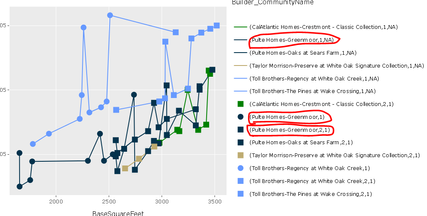
I am able to create custom visual using R Script and make hover over work in that visual by using this below link Link I think It is displaying legend for both line and point as well. This is how it is showing me in the graph
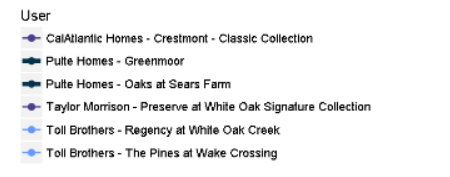
But I would like to show up something like this…. Which represents both the line and point in the same legend name.
Please find the R Script below, Please go through that and can you tell me where I was going wrong….
source('./r_files/flatten_HTML.r')
Library Declarations:
library(htmlwidgets);library(XML);library(ggplot2);library(plotly);
Values$Storiesgrouping <- as.character(Values$Storiesgrouping)
Cols <- as.character(Values$Color)
names(Cols) <- as.character(Values$Builder_CommunityName)
Sizs <- as.numeric(Values$Size)
names(Sizs) <- as.character(Values$Builder_CommunityName)
Actual code:
g <- ggplot(Values, aes(x=BaseSquareFeet, y=BasePriceM,
group=Builder_CommunityName, color=Builder_CommunityName))+
geom_line()+
geom_point(aes(shape=Storiesgrouping), show.legend=FALSE,size=3)+
scale_colour_manual(values = Cols)+
scale_size_manual(values = Sizs)+
scale_shape_manual(values=c("1"=19, "2"=15, "3+"=17))
plot(g)
We recommend to send this issue to pbircvsupport@microsoft.com.
This email alias is supported by expirienced R-script developers.
Ignat Vilesov,
Software Engineer
Microsoft Power BI Custom Visuals
The Power BI Data Visualization World Championships is back! Get ahead of the game and start preparing now!
| User | Count |
|---|---|
| 4 | |
| 2 | |
| 2 | |
| 1 | |
| 1 |
| User | Count |
|---|---|
| 4 | |
| 4 | |
| 4 | |
| 3 | |
| 2 |