cancel
Showing results for 
Search instead for 
Did you mean: 

Data Days is here! Join us now for 60+ days of learning, challenges, and connection. Learn more

Reply
jasgun
Frequent Visitor

Line chart track time

Hi,


I'm not sure this is covered although I just voted on the idea to have time in the Y axis.


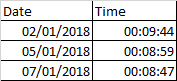
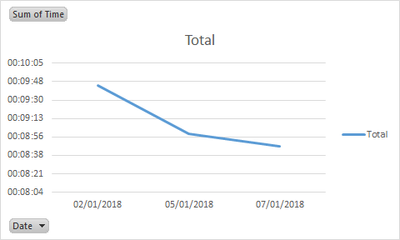
I want to initially set up a basic line graph that track my rowing time by date.

This is easily done in Excel, but would rather recreate in Power BI.


image.png 


image.png


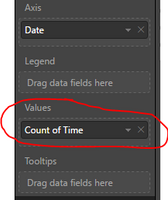
However on Power BI I can only show the values as Count:


image.png


Is there a way around this?


Thanks in advanced.


Jason

1 ACCEPTED SOLUTION
v-chuncz-msft
Community Support
Community Support

@jasgun,


Alternatively, you may show time in seconds and drag time to Tooltips.

Community Support Team _ Sam Zha
If this post helps, then please consider Accept it as the solution to help the other members find it more quickly.

View solution in original post

1 REPLY 1
v-chuncz-msft
Community Support
Community Support

@jasgun,


Alternatively, you may show time in seconds and drag time to Tooltips.

Community Support Team _ Sam Zha
If this post helps, then please consider Accept it as the solution to help the other members find it more quickly.

Helpful resources

Announcements
Fabric Data Days is here Carousel

Fabric Data Days 2026

Don't miss out on Data Days, June 15 through August 7. Learn Fabric, Power BI, SQL, AI and more.

May Power BI Update Carousel

Power BI Monthly Update - May 2026

Check out the May 2026 Power BI update to learn about new features.

Power BI DataViz World Championships carousel

Power BI DataViz World Championships - June 2026

A new Power BI DataViz World Championship is coming this June! Don't miss out on submitting your entry.

Top Kudoed Authors