cancel
Showing results for 
Search instead for 
Did you mean: 

The Power BI Data Visualization World Championships is back! Get ahead of the game and start preparing now! Learn more

Reply
sc0214h
New Member

Line Graph Not Working

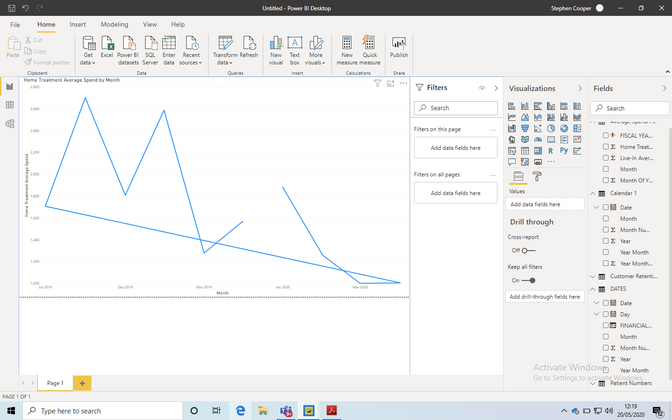
Screenshot 2020-05-20 at 12.19.39.png

Hi, I'm relatively new to POWERBI (I've only just learned Date Tables and Financial Year Sorting), and i've done that and this has started happening to my Line Graph. Any Help?

4 REPLIES 4
Greg_Deckler
Community Champion
Community Champion

Check your x-axis setting and make sure that the axis is set to Continuous and not Categorical.


Follow on LinkedIn
@ me in replies or I'll lose your thread!!!
Instead of a Kudo, please vote for this idea
Become an expert!: Enterprise DNA
External Tools: MSHGQM
YouTube Channel!: Microsoft Hates Greg
Latest book!:
DAX For Humans

DAX is easy, CALCULATE makes DAX hard...

Hi,


I found that my X-Axis is already continuous.

Anonymous
Not applicable

Hi @sc0214h 

I have two suggestions:

1. What is the Start value of your Y axis -- did you leave it as "Auto" or set it to some number? If you set it to a number, perhaps the missing month's value is below that number?


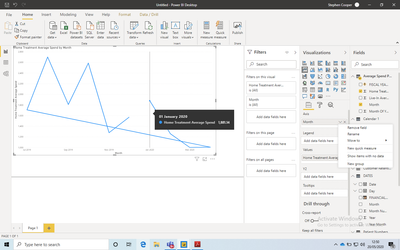
2. Tell Power BI to include months that have no data.  

nodata.png 


HTH

Michele

Screenshot 2020-05-20 at 12.50.41.png

Hi, Thanks. I can't find that... perhaps i'm missing the obvious here.

Helpful resources

Announcements
Power BI DataViz World Championships

Power BI Dataviz World Championships

The Power BI Data Visualization World Championships is back! Get ahead of the game and start preparing now!

November Power BI Update Carousel

Power BI Monthly Update - November 2025

Check out the November 2025 Power BI update to learn about new features.

FabCon Atlanta 2026 carousel

FabCon Atlanta 2026

Join us at FabCon Atlanta, March 16-20, for the ultimate Fabric, Power BI, AI and SQL community-led event. Save $200 with code FABCOMM.