Hey Guys,
I'm trying to build a KPI indicator inside the table visual, learning from the
https://dataveld.com/2018/07/16/use-svg-images-in-power-bi-part-3. I have put foward the below KPI,
KPI =
VAR MessageTextComplete = LOOKUPVALUE('HR Tracking Tool'[Quater year],[Current Status],"Complete")
VAR MessageTextBehind = LOOKUPVALUE('HR Tracking Tool'[Quater year],[Current Status],"In Progress - Behind")
VAR MessageTextTrack = LOOKUPVALUE('HR Tracking Tool'[Quater year],[Current Status],"In Progress - Tracking Well")
VAR MessageText = ""
VAR Radius = 9
VAR ColorRed ="red"
VAR ColorBlue ="blue"
VAR ColorGreen ="green"
VAR ColorYellow ="yellow"
VAR Opacity = 0.75
& "<circle cx='25' cy='10' r='"
& Radius
& "' fill='"
& ColorRed
& "' fill-opacity='"
& Opacity
& "' />"
& "<text x='15%' y='95%' text-anchor='bottom' font-family='Verdana' font-size='8px'>" & MessageText & "</text>"
& "</svg>"
VAR Complete = "data:image/svg+xml;utf8,"
& "<circle cx='25' cy='10' r='"
& Radius
& "' fill='"
& ColorBlue
& "' fill-opacity='"
& Opacity
& "' />"
& "<text x='15%' y='95%' text-anchor='bottom' font-family='Verdana' font-size='8px'>" & MessageTextComplete & "</text>"
& "</svg>"
VAR InProgressBehind = "data:image/svg+xml;utf8,"
& "<circle cx='25' cy='10' r='"
& Radius
& "' fill='"
& ColorYellow
& "' fill-opacity='"
& Opacity
& "' />"
& "<text x='15%' y='95%' text-anchor='bottom' font-family='Verdana' font-size='8px'>" & MessageText & "</text>"
& "</svg>"
VAR InProgressTracking = "data:image/svg+xml;utf8,"
& "<circle cx='25' cy='10' r='"
& Radius
& "' fill='"
& ColorGreen
& "' fill-opacity='"
& Opacity
& "' />"
& "<text x='15%' y='95%' text-anchor='bottom' font-family='Verdana' font-size='8px'>" & MessageTextTrack & "</text>"
& "</svg>"
RETURN
SWITCH (
TRUE (),
SUM('HR Tracking Tool'[Color Label]) =4, Complete,
SUM('HR Tracking Tool'[Color Label]) =2, InProgressBehind,
SUM('HR Tracking Tool'[Color Label]) =3, InProgressTracking,
Neutral)
I tried using different DAX functions such as VALUES and FORMAT but its still giving circular dependency issue.
I'm trying to get below output
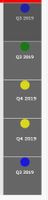 output expected to look from KPI
Or if there is any other better way to achieve this, I'm open to try it.
Can some one please help


