cancel
Showing results for 
Search instead for 
Did you mean: 

The Power BI Data Visualization World Championships is back! Get ahead of the game and start preparing now! Learn more

Reply
Anonymous
Not applicable

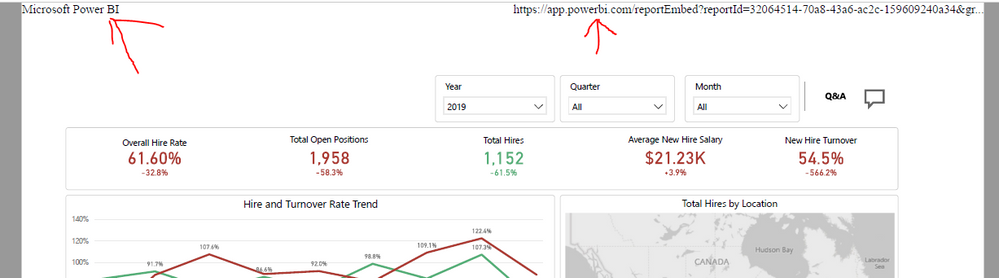
Is there any way to stop "Microsoft Power BI" and the url from being added to a printed Report?

I'm using Power BI Embedded. When printing a report "Microsoft Power BI" and the Url are added to the top of the report. Is there any way to remove this?

Capture.PNG


4 REPLIES 4
dm-p
Super User
Super User

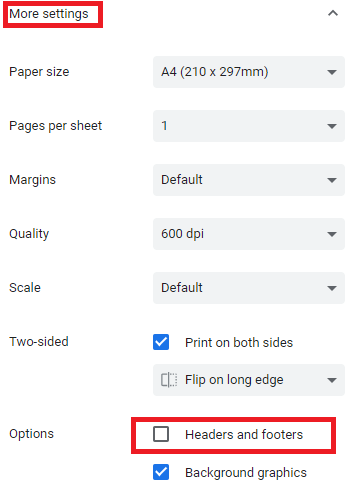
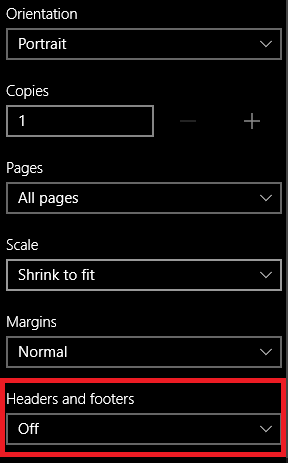
Hi @Anonymous - I can't answer this from a Power BI Embedded perspective, but just wanted to throw this up as a possibility. Are you printing using the function in your web browser? If so then most browsers have a Headers and Footers option in their print dialog that is set by default.

Here's where to find in Chrome:

image.png

Here it is in Edge:

image.png

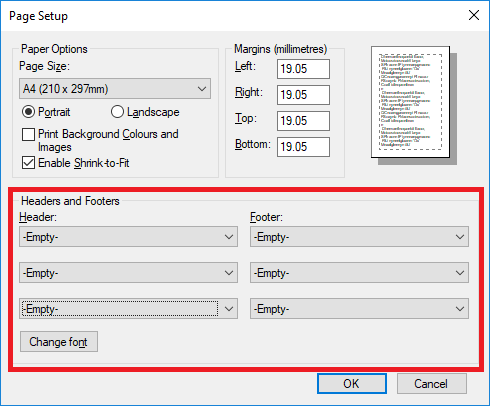
Internet Explorer (of course) is a bit different, and this can be found in Print Preview > Page Setup. Make sure all boxes in the Headers and Footers section are set to -Empty-, e.g.:

image.png


Hopefully this might be what you need. If not, then I'm sure one of the more experienced Embedded folks can help you out.

Good luck!

Daniel


Did I answer your question? Mark my post as a solution!

Proud to be a Super User!


On how to ask a technical question, if you really want an answer (courtesy of SQLBI)


Anonymous
Not applicable

Thanks Daniel, but this is for my customers and the print function is being called using the api function report.print(), so this wouldn't work. What I'm looking for is if there is a way during the call the stop those headers from being added.

Hmmm... I've had a look at print() and its doc states that it's invoking window.print(), which is pretty much browser-specific, and has no additional parameters available to it.

I've done some research (read: furious Googling and experimenting with answers) on what can be done when working with this method, and there doesn't seem to be much that can be done about it. A lot of these articles suggest using a CSS Media Query, but I couldn't find an example that really worked.

The best I could find was this answer on StackOverflow - it's from a while ago but there is still some recently discussion on it so you may have some success - this answer from last year suggests that you might get somewhere with using modern Chrome/Firefox.

I'll have to tap-out at this point, but hopefully this might help.

Regards,

Daniel


Did I answer your question? Mark my post as a solution!

Proud to be a Super User!


On how to ask a technical question, if you really want an answer (courtesy of SQLBI)


Anonymous
Not applicable

Thanks. It looks like I'll have to live with it for now.

Helpful resources

Announcements
Power BI DataViz World Championships

Power BI Dataviz World Championships

The Power BI Data Visualization World Championships is back! Get ahead of the game and start preparing now!

December 2025 Power BI Update Carousel

Power BI Monthly Update - December 2025

Check out the December 2025 Power BI Holiday Recap!

FabCon Atlanta 2026 carousel

FabCon Atlanta 2026

Join us at FabCon Atlanta, March 16-20, for the ultimate Fabric, Power BI, AI and SQL community-led event. Save $200 with code FABCOMM.