cancel
Showing results for 
Search instead for 
Did you mean: 

We've captured the moments from FabCon & SQLCon that everyone is talking about, and we are bringing them to the community, live and on-demand. Starts on April 14th. Register now

Reply
Anonymous
Not applicable

Interactive Navigation panel

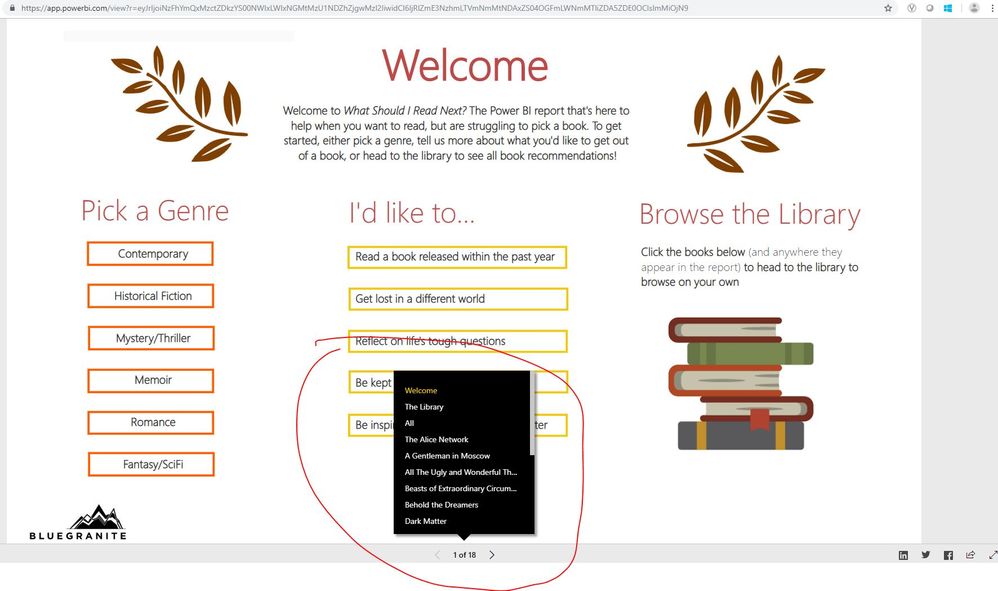
How would one achieve this navigation panel using bookmark?  I tried everything and can't seem to find a solution.

navigation panel.JPG

Link to this app: 

https://app.powerbi.com/view?r=eyJrIjoiNzFhYmQxMzctZDkzYS00NWIxLWIxNGMtMzU1NDZhZjgwMzI2IiwidCI6IjRlZ...


4 REPLIES 4
Greg_Deckler
Community Champion
Community Champion

You want a link to each page or you want a link to each page in a fly-out menu?


Follow on LinkedIn
@ me in replies or I'll lose your thread!!!
Instead of a Kudo, please vote for this idea
Become an expert!: Enterprise DNA
External Tools: MSHGQM
YouTube Channel!: Microsoft Hates Greg
Latest book!:
DAX For Humans

DAX is easy, CALCULATE makes DAX hard...
Anonymous
Not applicable

Hi Greg,


I want exactly like that demo.  Flyout menu when clicked, and next/previous arrow.  Please give me a tutorial how to get that done.


Thank you,

So, what you would need to do would be to create an image for each of those links, I would include the background. Place all of these images on the page and link each to a bookmark. You would then create a button or something to display the fly-out menu, which is really just your images hidden. So, you would have the default view bookmark which has all of those image visuals hidden. You would then create another bookmark with all of the images visible. You would tie your button to display the fly-out menu to this second bookmark. Now you would have a button/image that the user could click that would make the "fly-out" menu visible. The user would then click one of the unhidden images to take them to the bookmark of their choice.


Follow on LinkedIn
@ me in replies or I'll lose your thread!!!
Instead of a Kudo, please vote for this idea
Become an expert!: Enterprise DNA
External Tools: MSHGQM
YouTube Channel!: Microsoft Hates Greg
Latest book!:
DAX For Humans

DAX is easy, CALCULATE makes DAX hard...
Anonymous
Not applicable

Thank you for your reply. 

However, do you think that this could be using Power BI embedded?  Otherwise, how would I hide the tabs from displaying and show only flyout menu?  How do I add the Full Screen action button to right of the navigation panel?  


https://app.powerbi.com/view?r=eyJrIjoiNzFhYmQxMzctZDkzYS00NWIxLWIxNGMtMzU1NDZhZjgwMzI2IiwidCI6IjRlZ...


Thank you so much for your help.


Helpful resources

Announcements
New to Fabric survey Carousel

New to Fabric Survey

If you have recently started exploring Fabric, we'd love to hear how it's going. Your feedback can help with product improvements.

Power BI DataViz World Championships carousel

Power BI DataViz World Championships - June 2026

A new Power BI DataViz World Championship is coming this June! Don't miss out on submitting your entry.

Join our Fabric User Panel

Join our Fabric User Panel

Share feedback directly with Fabric product managers, participate in targeted research studies and influence the Fabric roadmap.

March Power BI Update Carousel

Power BI Community Update - March 2026

Check out the March 2026 Power BI update to learn about new features.