cancel
Showing results for 
Search instead for 
Did you mean: 

The Power BI Data Visualization World Championships is back! Get ahead of the game and start preparing now! Learn more

Reply
akasthan
Microsoft Employee
Microsoft Employee

Incremental refresh not working

Hello, 

I have setup an incremental refresh on our dataset and despite the data having new values, it is not being reflected in PowerBI dashboard.


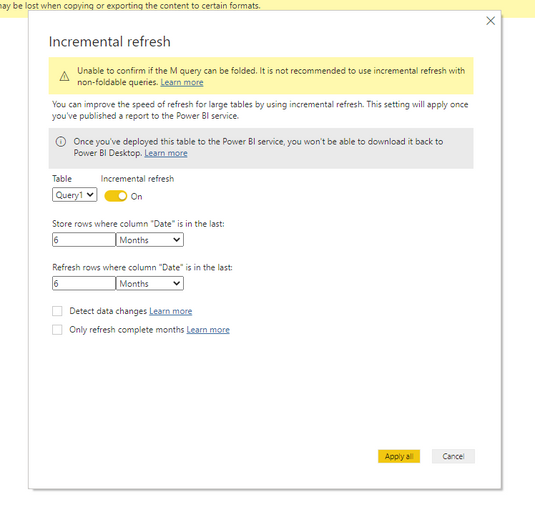
Here the data source is Azure Data Lake Storage Gen 1 and file being a .tsv file. When I was setting up incremental refresh I did get the warning that "Unable to confirm if the M query can be folded. It is not recommended to use incremental refresh with non-foldable queries.".


M query being

let
Source = DataLake.Contents("adl://ffo-prod-c14.azuredatalakestore.net/local/Analytics/PrivacyManagement/PowerBITemp/", [PageSize=null]),
#"MPU tsv" = Source{[Name="MPU.tsv"]}[Content],
#"Imported CSV" = Csv.Document(#"MPU tsv",[Delimiter="#(tab)", Columns=16, Encoding=65001, QuoteStyle=QuoteStyle.None]),
#"Promoted Headers" = Table.PromoteHeaders(#"Imported CSV", [PromoteAllScalars=true]),
#"Changed Type" = Table.TransformColumnTypes(#"Promoted Headers",{{"TenantId", type text}, {"UserId", type text}, {"PolicyMode", type text}, {"PrivacyManagementScenario", type text}, {"DigestEmailEnabled", type logical}, {"TeamsInTheMomentEnabled", type logical}, {"Date", type datetime}, {"TenantName", type text}, {"Country", type text}, {"HasE1License", type logical}, {"HasE3License", type logical}, {"HasE5License", type logical}, {"TenantSize", type text}, {"Industry", type text}, {"IsS500", type logical}, {"IsS2500", type logical}}),
#"Filtered Rows" = Table.SelectRows(#"Changed Type", each [Date] >= RangeStart and [Date] <= RangeEnd)
in
#"Filtered Rows"


akasthan_0-1636379580555.png

I further increased the refresh rows condition to 6 months and disabled detect data change but upon refresh in PowerBI portal, data is not getting refreshed.


Can someone help me point out if I am doing something wrong?

Also whether Azure Data Lake Storage Gen1 supports incremental refresh or not? If not is there any alternative way using which I can pull large dataset from ADLS to PowerBI?


Can share more details if needed. 

Thanks

Akash

2 REPLIES 2
akasthan
Microsoft Employee
Microsoft Employee

Hi @Anonymous 
The refresh operation is getting completed successfully but I cant find the latest values in the data. 
Date/Time parameter is fine. Both RangeStart and RangeEnd are of Date/Time format only.

Anonymous
Not applicable

Hi @akasthan 

The warning that "Unable to confirm if the M query can be folded. It is not recommended to use incremental refresh with non-foldable queries." doesn't means your data source couldn't set incremental refresh. This warns you that your data source doesn't support query fold, incremental refresh may not have a good performance when refresh. 

Can you refresh your report successfully?

Is your problem that your refresh is successful but you couldn't find the latest value?

Here is a blog about setting incremental refresh for Azure Data Lake Storage.

For reference:

Parquet, ADLS Gen2, ETL, and Incremental Refresh in one Power BI Dataset

Please check your data/time parameter.

Cannot set up incremental refresh


Best Regards,
Rico Zhou


If this post helps, then please consider Accept it as the solution to help the other members find it more quickly.

Helpful resources

Announcements
Power BI DataViz World Championships

Power BI Dataviz World Championships

The Power BI Data Visualization World Championships is back! Get ahead of the game and start preparing now!

December 2025 Power BI Update Carousel

Power BI Monthly Update - December 2025

Check out the December 2025 Power BI Holiday Recap!

FabCon Atlanta 2026 carousel

FabCon Atlanta 2026

Join us at FabCon Atlanta, March 16-20, for the ultimate Fabric, Power BI, AI and SQL community-led event. Save $200 with code FABCOMM.