cancel
Showing results for 
Search instead for 
Did you mean: 

Data Days is here! Join us now for 60+ days of learning, challenges, and connection. Learn more

Reply
pvuppala
Helper V
Helper V

Identify/extract Data Sources using PersonalGateways

Hello Gurus,

We're going through some Personal Gateways and its usage. We finally turned off the PersonalGateway installs using this simple command


Set-DataGatewayTenantPolicy -PersonalGatewayInstallPolicy Restricted


Also, I am able to identify all existing PersonalGateways via a combination of these commands


Get-DataGatewayCluster -Scope Organization | Where-object {($_.Type -eq "Personal") } 


Get-DataGatewayCluster -Scope Organization | Where-object {($_.Type -eq "Personal") }


Next step is to idenfity all or any datasources/workspaces these personal gateways are being consumed.  Any ideas on how to proceed?


TIA.

5 REPLIES 5
Anonymous
Not applicable

Hi @pvuppala ,

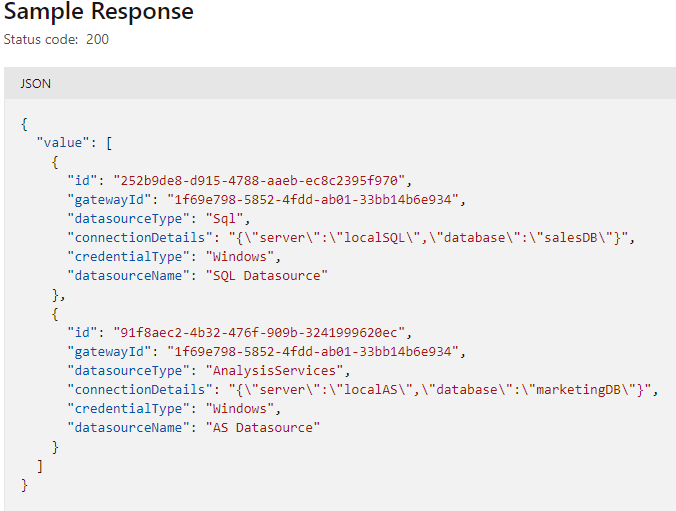
Please check if REST API Gateways - Get Datasources is what you want...

GET https://api.powerbi.com/v1.0/myorg/gateways/{gatewayId}/datasources

yingyinr_0-1652256872254.png

Best Regards

pvuppala
Helper V
Helper V

Thats exactly what I mean't when I said to we're planning to have all customers go through Enterprise gateways 🙂 For now, I'm still looking to identify what content is using Personal Gateways so we can notify the customers.  I'm meeting our MS support next week so I will update on our working session.

lbendlin
Super User
Super User

What's your rationale for caring about that?


Anyway, the tenant audit logs have sections for gateway connection creation/modification. As far as I can tell that includes personal gateways.

The idea behind is to stop folks installing Personalmode and go through an Enteprise Data Gateway for compliance reasons etc.,  We as admins trying to put some guardrails on data sources to make sure customers follow this process.

We solve that differently - by offering the users the option to use our enterprise gateways that have much better performance, guaranteed uptime ( with multiple cluster members each) and full sets of connection drivers. 


Don't forget that personal gateways are required for R and Python scheduled refreshes.

Helpful resources

Announcements
Fabric Data Days is here Carousel

Fabric Data Days 2026

Don't miss out on Data Days, June 15 through August 7. Learn Fabric, Power BI, SQL, AI and more.

May Power BI Update Carousel

Power BI Monthly Update - May 2026

Check out the May 2026 Power BI update to learn about new features.

Power BI DataViz World Championships carousel

Power BI DataViz World Championships - June 2026

A new Power BI DataViz World Championship is coming this June! Don't miss out on submitting your entry.

Top Kudoed Authors