Get Fabric or SQL Certified for Free.
Get certified for free when you join Fabric Data Days 2026 and dive into Fabric, Power BI, SQL, AI, and other essential data skills.
Join now- Power BI forums
- Get Help with Power BI
- Desktop
- Service
- Report Server
- Power Query
- Mobile Apps
- Developer
- DAX Commands and Tips
- Custom Visuals Development Discussion
- Health and Life Sciences
- Power BI Spanish forums
- Translated Spanish Desktop
- Training and Consulting
- Instructor Led Training
- Dashboard in a Day for Women, by Women
- Galleries
- Data Stories Gallery
- Themes Gallery
- Contests Gallery
- QuickViz Gallery
- Quick Measures Gallery
- Visual Calculations Gallery
- Fabric Apps Gallery
- Notebook Gallery
- Translytical Task Flow Gallery
- TMDL Gallery
- R Script Showcase
- Webinars and Video Gallery
- Ideas
- Custom Visuals Ideas (read-only)
- Issues
- Issues
- Events
- Upcoming Events
July 7 - July 17 | Round 2 of the Power BI Dataviz World Championships. Don't miss your chance! Learn more
- Power BI forums
- Forums
- Get Help with Power BI
- Developer
- Re: HubSpot API Ingestion into PowerBI
- Subscribe to RSS Feed
- Mark Topic as New
- Mark Topic as Read
- Float this Topic for Current User
- Bookmark
- Subscribe
- Printer Friendly Page

- Mark as New
- Bookmark
- Subscribe
- Mute
- Subscribe to RSS Feed
- Permalink
- Report Inappropriate Content
HubSpot API Ingestion into PowerBI
I have a user who is using a CDATA ODBC HubSpot connector to ingest certain data into PowerBI. As some of you are aware, this presents a challenge to them when they go on vacation or are away from their PC and data refreshes fail... thus other users of the report not receiving updated data. I have explored the HubSpot (BETA) connector out on GitHub, but that will not run through the two PowerBI Gateways even thought I have added this connector to be used through each of those gateways. So, I am thinking about two options but would like insight into any other possible angles, or perhaps a best angle to approach this. Here's what I'm thinking:

1. Use the Web option to pull in specific data via the HubSpot API site. This is undesirable because it will cause me to have to do a lot of leg work to pull in the right data via API commands, but this may be an option.
2. Move the ODBC Connector to one of the BI gateway servers since they are persistent and publish the report from there. This isn't as intuitive and relies on more failure points, but is something I am tossing around as an idea.
3. Discover how to make the HubSpot connector from GitHub work with our existing BI Gateways
3. Any other possible options that any of you may have!
Thank you in advance!


- Mark as New
- Bookmark
- Subscribe
- Mute
- Subscribe to RSS Feed
- Permalink
- Report Inappropriate Content
Hi, the gateway dependency is exactly the problem we ran into with ODBC-based connectors too. The approach that solved it for us was switching to a connector that loads HubSpot data into a cloud database first, so Power BI connects to SQL rather than directly to HubSpot. No gateway needed, refreshes run automatically regardless of who is at their desk.
This is the one I ended up using: https://vidi-corp.com/hubspot-power-bi-connector/
14-day trial if you want to see whether it fits your setup.

- Mark as New
- Bookmark
- Subscribe
- Mute
- Subscribe to RSS Feed
- Permalink
- Report Inappropriate Content
Skyvia provides two methods for integrating Power BI with HubSpot. One involves syncing HubSpot data to a data warehouse that's connected to Power BI, and the other involves creating an OData feed from HubSpot data for direct consumption by Power BI. These options facilitate seamless data import and analytics.

- Mark as New
- Bookmark
- Subscribe
- Mute
- Subscribe to RSS Feed
- Permalink
- Report Inappropriate Content
A HubSpot Certified App is available in the HubSpot App Marketplace for connecting HubSpot to Power BI. There is a free trial.
https://ecosystem.hubspot.com/marketplace/apps/marketing/analytics-data/powerbi
Here is a map of data flow from HubSpot to Power BI that the integration provides:
HubSpot Data Data Flow Power BI
| Companies | --> | Companies |
| Contacts | --> | Contacts |
| Deals | --> | Deals |
| Engagements | --> | Engagements |
| Email Events | --> | Email Events |
| Tickets | --> | Tickets |
| Owners | --> | Owners |
| Products | --> | Products |
| Forms | --> | Forms |
| Companies | --> | Company Properties |
| Contacts | --> | Contact Properties |
| Associations | --> | CRM Associations |
| Deal Pipelines | --> | Deal Pipelines |
| Deals | --> | Deal Properties |
| CampaignEmailEvents | --> | Marketing Email |
| Custom Objects | --> | CRM Associations |
| Quotes | --> | CRM Associations |
| Contact Lists | --> | Contact Lists |
| Website Pages | --> | Analytics |
| Workflows | --> | Workflows |
Here is a link to the documentation: https://support.datawarehouse.io/hc/en-us/articles/360006051874-Power-Bi-Connector-Manual


- Mark as New
- Bookmark
- Subscribe
- Mute
- Subscribe to RSS Feed
- Permalink
- Report Inappropriate Content
Hi @JMACND ,
"3. Discover how to make the HubSpot connector from GitHub work with our existing BI Gateways"
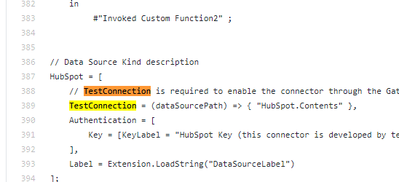
I checked the code of this custom connector and found that the function used with the gateway has been implemented in the code. It may be a problem with your gateway configuration.
powerbi-custom-connectors/HubSpot/code/HubSpot.pq
Try to refer to the Link.
Considerations and limitations
Best regards,
Lionel Chen
If this post helps, then please consider Accept it as the solution to help the other members find it more quickly.
- Mark as New
- Bookmark
- Subscribe
- Mute
- Subscribe to RSS Feed
- Permalink
- Report Inappropriate Content
Test connection doesn't inspire a lot of confidence in this being a reliable long-term solution... unless others disagree :).


- Mark as New
- Bookmark
- Subscribe
- Mute
- Subscribe to RSS Feed
- Permalink
- Report Inappropriate Content
I would disagree. Test Connection is a critical part of gateway maintenance. It should never be disabled/skipped.
- Mark as New
- Bookmark
- Subscribe
- Mute
- Subscribe to RSS Feed
- Permalink
- Report Inappropriate Content
Can you confirm that you have created the 64-bit ODBC connection for Hubspot on all your gateway cluster members and that the connection test worked?
- Mark as New
- Bookmark
- Subscribe
- Mute
- Subscribe to RSS Feed
- Permalink
- Report Inappropriate Content
When you say ODBC Connection, you mean using the CDATA ODBC Driver for HubSpot? Or, just a generic ODBC Connection?

Helpful resources

FabCon & SQLCon – Barcelona 2026
Join us in Barcelona for FabCon and SQLCon, the Fabric, Power BI, SQL, and AI community event. Save €200 with code FABCMTY200.

Power BI Monthly Update - July 2026
Check out the July 2026 Power BI update to learn about new features.

Data Days 2026
Join Data Days 2026: 60 days of free live/on-demand sessions, challenges, study groups, and certification opportunities.

Power BI DataViz World Championships - June 2026
A new Power BI DataViz World Championship is coming this June! Don't miss out on submitting your entry.


