cancel
Showing results for 
Search instead for 
Did you mean: 

Learn from the best! Meet the four finalists headed to the FINALS of the Power BI Dataviz World Championships! Register now

Reply
EdwinFree
New Member

How to test PowerBI Report Server API by using Postman

I am trying to test the PBI ReportServer API by using Postman.

Most document talks doing this under PBI Server or within the AD Domain. However, my PBI ReportServer is deployed on Azure VM, and I am trying to test the API on my PC's Postman, which means it's out of domain. The API responsed with 401 Unauthorized. 

Clearly, I need to get authoriation token or setup some key before I call the API. The official document also talks little about the authoriation. https://docs.microsoft.com/en-us/power-bi/report-server/rest-api


Do you guys meet same scenairo and how to fix this?

1 ACCEPTED SOLUTION
EdwinFree
New Member

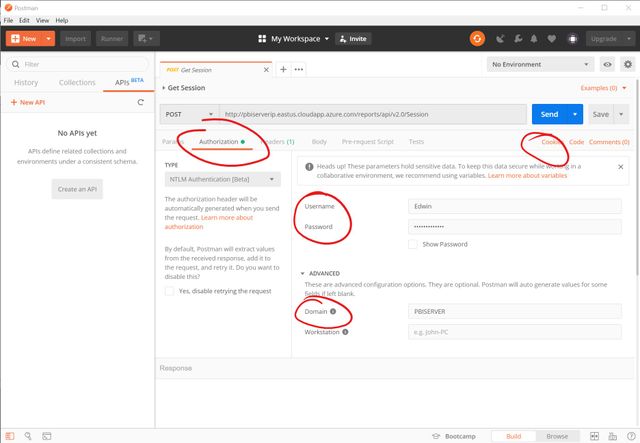
I findout the default authoriation is cookies based. And I solved this problem by using NTLM Authoriation.

Annotation 2019-06-05 210829.jpg


After called the POST Session API, you will get Cookies and you can call other APIs.

However, there is another problems, that is the Cookie seems not get expired. And I find the official DELETE Session API not works.

View solution in original post

2 REPLIES 2
EdwinFree
New Member

I findout the default authoriation is cookies based. And I solved this problem by using NTLM Authoriation.

Annotation 2019-06-05 210829.jpg


After called the POST Session API, you will get Cookies and you can call other APIs.

However, there is another problems, that is the Cookie seems not get expired. And I find the official DELETE Session API not works.

@EdwinFree I have done what you said and I can be able to retrieve the data but I'm getting the unauthorized error if I'm not using it for more than 2-3 minutes then I again need to create the session and make a request to retrieve the data, but you said the session will never expire right?

Helpful resources

Announcements
New to Fabric survey Carousel

New to Fabric Survey

If you have recently started exploring Fabric, we'd love to hear how it's going. Your feedback can help with product improvements.

Power BI DataViz World Championships carousel

Power BI DataViz World Championships - June 2026

A new Power BI DataViz World Championship is coming this June! Don't miss out on submitting your entry.

Join our Fabric User Panel

Join our Fabric User Panel

Share feedback directly with Fabric product managers, participate in targeted research studies and influence the Fabric roadmap.

March Power BI Update Carousel

Power BI Community Update - March 2026

Check out the March 2026 Power BI update to learn about new features.