cancel
Showing results for 
Search instead for 
Did you mean: 

The Power BI Data Visualization World Championships is back! Get ahead of the game and start preparing now! Learn more

Reply
Anonymous
Not applicable

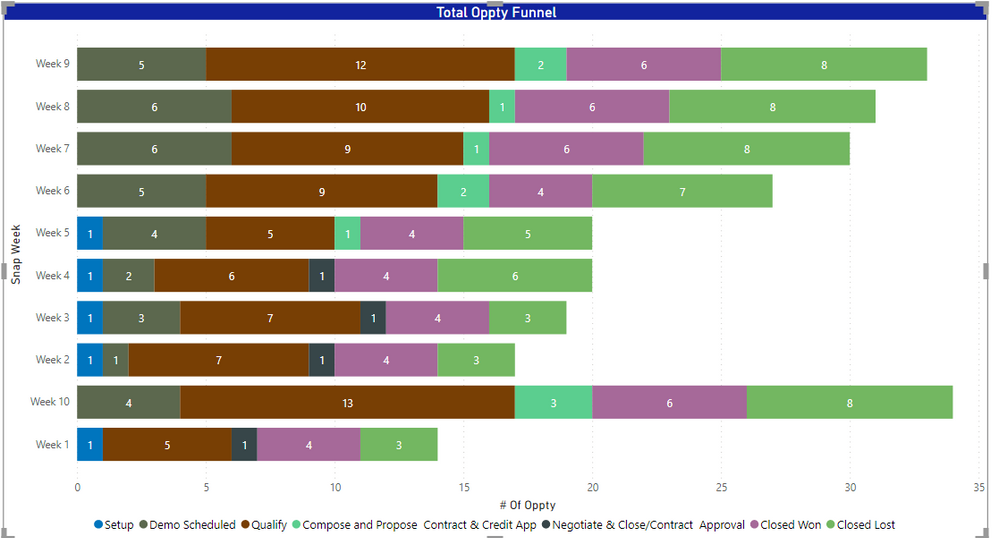
How to sort week proper order in bar chart Power BI

Sample data

Funnel_IdSnap_weekStage Name
3DMCR-OPP111263:Week 1week 10Closed Won
3DMCR-OPP111249:Week 1week 8Closed Won
3DMCR-OPP111570:Week 1week 9Validate Opportunity
3DMCR-OPP111645:Week 1week 6Understand Opportunity
3DMCR-OPP111536:Week 1week 7Closed Lost
3DMCR-OPP111587:Week 1week 5Closed Lost
3DMCR-OPP111588:Week 1week 3Closed Lost
3DMCR-OPP111529:Week 1week 4Negotiate & Close/Contract  Approval
3DMCR-OPP111555:Week 1week 1Closed Won
3DMCR-OPP111726:Week 1week 2Qualify Opportunity

Oppty report.png


Regards

Vilas

1 ACCEPTED SOLUTION
lbendlin
Super User
Super User

Add another column with the numeric week value, and then sort your Snap_week column by the new column.


let
    Source = Table.FromRows(Json.Document(Binary.Decompress(Binary.FromText("hdFBC4IwGMbxrzI8G23TTesWdqy0oDyYh5ErJNlEZ+G3b3mJXkFv/8vvZTzLMsfb7qPTIk4SQgjl3jqV8omI4zrvIbCtqNKtLFCqlZO7QPgrIMJpwAIMwMrGRVRlIYxEcV3rxnSqNP2Icp8Bym2cVSGb1ghVTGLmcYCD30N3ujVjEQZAsFkRAuHNCQrn820c5EOb8jvHtcOYcjScWEZamUbcDEKbum70S1TjewxORKa/I6BwFmrj2Nn/uPf/g+Yf", BinaryEncoding.Base64), Compression.Deflate)), let _t = ((type nullable text) meta [Serialized.Text = true]) in type table [Funnel_Id = _t, Snap_week = _t, #"Stage Name" = _t]),
    #"Added Custom" = Table.AddColumn(Source, "Week #", each Int16.From(Text.Replace([Snap_week],"week","")))
in
    #"Added Custom"

How to use this code: Create a new Blank Query. Click on "Advanced Editor". Replace the code in the window with the code provided here. Click "Done".

View solution in original post

2 REPLIES 2
Anonymous
Not applicable

HI @Anonymous,

You can refer to the following link to create a custom sort table with particular index and legend values and link the fact table field to achieve custom sort order. (create a new table and set the index of these values, use relationship link to raw table field and use sort table fields to replace raw field on your chart)

Custom Sorting in Power BI 

Regards,

Xiaoxin Sheng

lbendlin
Super User
Super User

Add another column with the numeric week value, and then sort your Snap_week column by the new column.


let
    Source = Table.FromRows(Json.Document(Binary.Decompress(Binary.FromText("hdFBC4IwGMbxrzI8G23TTesWdqy0oDyYh5ErJNlEZ+G3b3mJXkFv/8vvZTzLMsfb7qPTIk4SQgjl3jqV8omI4zrvIbCtqNKtLFCqlZO7QPgrIMJpwAIMwMrGRVRlIYxEcV3rxnSqNP2Icp8Bym2cVSGb1ghVTGLmcYCD30N3ujVjEQZAsFkRAuHNCQrn820c5EOb8jvHtcOYcjScWEZamUbcDEKbum70S1TjewxORKa/I6BwFmrj2Nn/uPf/g+Yf", BinaryEncoding.Base64), Compression.Deflate)), let _t = ((type nullable text) meta [Serialized.Text = true]) in type table [Funnel_Id = _t, Snap_week = _t, #"Stage Name" = _t]),
    #"Added Custom" = Table.AddColumn(Source, "Week #", each Int16.From(Text.Replace([Snap_week],"week","")))
in
    #"Added Custom"

How to use this code: Create a new Blank Query. Click on "Advanced Editor". Replace the code in the window with the code provided here. Click "Done".

Helpful resources

Announcements
Power BI DataViz World Championships

Power BI Dataviz World Championships

The Power BI Data Visualization World Championships is back! Get ahead of the game and start preparing now!

December 2025 Power BI Update Carousel

Power BI Monthly Update - December 2025

Check out the December 2025 Power BI Holiday Recap!

FabCon Atlanta 2026 carousel

FabCon Atlanta 2026

Join us at FabCon Atlanta, March 16-20, for the ultimate Fabric, Power BI, AI and SQL community-led event. Save $200 with code FABCOMM.