cancel
Showing results for 
Search instead for 
Did you mean: 

We've captured the moments from FabCon & SQLCon that everyone is talking about, and we are bringing them to the community, live and on-demand. Starts on April 14th. Register now

Reply
aaronchen
Regular Visitor

How to run the code in PowerBI-JavaScript GitHub?

Hi,

I'm not familar with javascript build tool. 

How to run the code in here: https://github.com/Microsoft/PowerBI-JavaScript

I tried npm run build, npm start, not working.

I guess it's use different build tool.


Thanks

Aaron

1 ACCEPTED SOLUTION
v-jiascu-msft
Microsoft Employee
Microsoft Employee

Hi Aaron,


1. You need a web server to get this website work. The IIS is recommended.

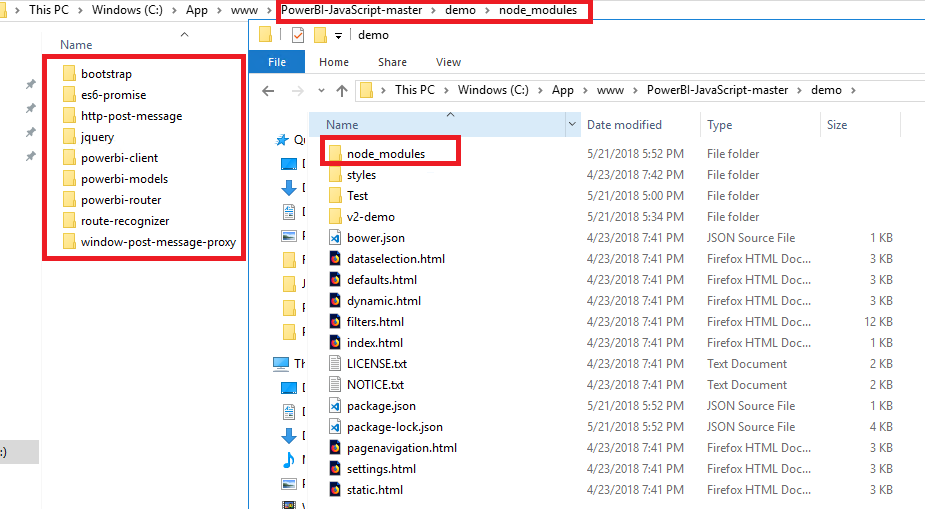
2. Install all the css and js packages. Please refer to PowerBI-JavaScript. (We need to install other packages other than "powerbi-client".

npm install --save powerbi-client
npm install --save bootstrap

3. It looks like this finally.


How to run the code in PowerBI-JavaScript GitHub.png


Best Regards,

Dale

Community Support Team _ Dale
If this post helps, then please consider Accept it as the solution to help the other members find it more quickly.

View solution in original post

3 REPLIES 3
Anonymous
Not applicable

I have a similar question, I installed the nuget package Microsoft.PowerBI.JavaScript 2.10.2.


In my view, I have the following line:

<head>

<script type="text/javascript" src="scripts/powerbi.js"></script>

</head>


I realize that this is referencing a local copy of this script that I have to put in the scripts folder.  This works fine, even without installing the package mentioned above.


My question is, how do I get my view to reference the powerbi.js that comes with the nuget package Microsoft.PowerBI.JavaScript 2.10.2?  Or am I not understanding how this is supposed to work?


v-jiascu-msft
Microsoft Employee
Microsoft Employee

Hi @aaronchen,


Did you make it?


Best Regards,

Dale

Community Support Team _ Dale
If this post helps, then please consider Accept it as the solution to help the other members find it more quickly.
v-jiascu-msft
Microsoft Employee
Microsoft Employee

Hi Aaron,


1. You need a web server to get this website work. The IIS is recommended.

2. Install all the css and js packages. Please refer to PowerBI-JavaScript. (We need to install other packages other than "powerbi-client".

npm install --save powerbi-client
npm install --save bootstrap

3. It looks like this finally.


How to run the code in PowerBI-JavaScript GitHub.png


Best Regards,

Dale

Community Support Team _ Dale
If this post helps, then please consider Accept it as the solution to help the other members find it more quickly.

Helpful resources

Announcements
New to Fabric survey Carousel

New to Fabric Survey

If you have recently started exploring Fabric, we'd love to hear how it's going. Your feedback can help with product improvements.

Power BI DataViz World Championships carousel

Power BI DataViz World Championships - June 2026

A new Power BI DataViz World Championship is coming this June! Don't miss out on submitting your entry.

Join our Fabric User Panel

Join our Fabric User Panel

Share feedback directly with Fabric product managers, participate in targeted research studies and influence the Fabric roadmap.

March Power BI Update Carousel

Power BI Community Update - March 2026

Check out the March 2026 Power BI update to learn about new features.