1. I was able to genrate Accesstoken using : (Works in postman)
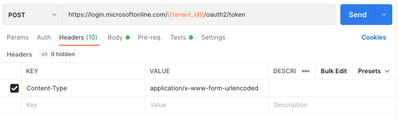
POST - https://login.microsoftonline.com/{{tenant_id}}/oauth2/token
Header:
Content-Type application/x-www-form-urlencoded
Body:
grant_type: client_credentials
client_secret: {{client_secret}}
client_id: {{client_id}}
resource: https://analysis.windows.net/powerbi/api
(works fine)
2. Get EmbedToken (Does not work in postman):
I could get the EmbedToken using link below.
https://learn.microsoft.com/en-us/rest/api/power-bi/embed-token/datasets-generate-token-in-group
(for our prototype, we will not want to use above step)
Using Postman I have tried many different scenarios, it all fails
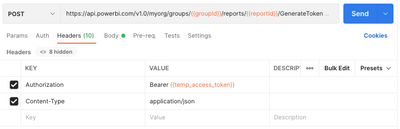
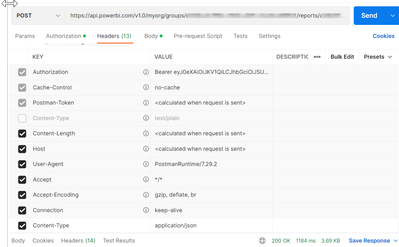
POST - https://api.powerbi.com/v1.0/myorg/groups/{{groupId}}/reports/{{reportId}}/GenerateToken
Header:
Authorization: Bearer {{temp_access_token}}
Host: <calculated when request is sent>
Content-Type: application/json
Body:
{
"accessLevel": "View",
"allowSaveAs": "false"
}
Result:
<HTML>
<HEAD>
<TITLE>Bad Request</TITLE>
<META HTTP-EQUIV="Content-Type" Content="text/html; charset=us-ascii">
</HEAD>
<BODY>
<h2>Bad Request - Invalid Hostname</h2>
<hr>
<p>HTTP Error 400. The request hostname is invalid.</p>
</BODY>
</HTML>
3. Get Embed URL (Does not work in postman)
This works:
(for our prototype, we will not want to use above step)
Using Postman
POST -https://api.powerbi.com/v1.0/myorg/groups/{{groupId}}/reports
Header:
Authorization: Bearer {{temp_access_token}}
Error:
{
"error": {
"code": "PowerBINotAuthorizedException",
"pbi.error": {
"code": "PowerBINotAuthorizedException",
"parameters": {},
"details": [],
"exceptionCulprit": 1
}
}
}