cancel
Showing results for 
Search instead for 
Did you mean: 

Learn from the best! Meet the four finalists headed to the FINALS of the Power BI Dataviz World Championships! Register now

Reply
PowerBiLearner1
New Member

How to add a date filter?

I've been doing an Edx course telling me to add a date filter. Period. No other information was given and I've been looking for it all over the place but nowhere. Im importing data from Acces 2010 and edited it on Power BI before use. The problem is I can't find the Date Filter Man Indifferent

1 ACCEPTED SOLUTION
ashishrj
Power Participant
Power Participant

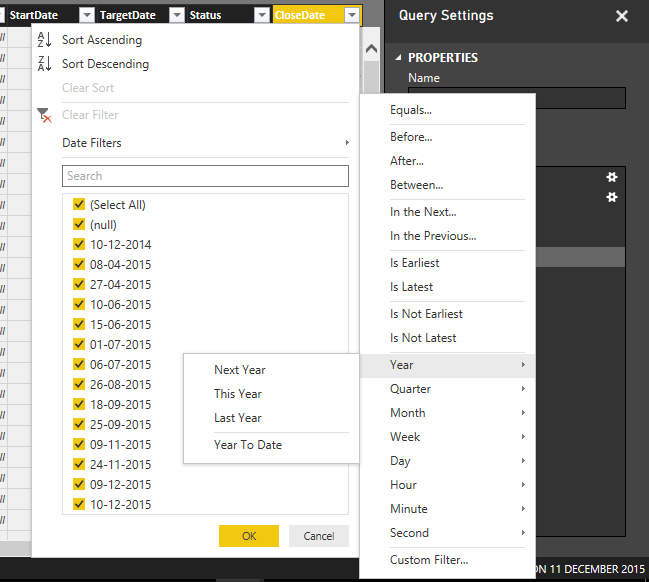
@PowerBiLearner1 In Power BI Desktop Tool, click edit queries from top ribbon and then select the date field and apply filter as required as shown in screen capture below.

 DateFilter.png

View solution in original post

3 REPLIES 3
ashishrj
Power Participant
Power Participant

@PowerBiLearner1 In Power BI Desktop Tool, click edit queries from top ribbon and then select the date field and apply filter as required as shown in screen capture below.

 DateFilter.png

Thanks! I've just found out a little earlier.. I forgot to post that. So thanks anyway!


What did you choose to filter from year December 31st, 1999 to  January 1st, 2000 ? 

Helpful resources

Announcements
Power BI DataViz World Championships carousel

Power BI DataViz World Championships - June 2026

A new Power BI DataViz World Championship is coming this June! Don't miss out on submitting your entry.

Join our Fabric User Panel

Join our Fabric User Panel

Share feedback directly with Fabric product managers, participate in targeted research studies and influence the Fabric roadmap.

March Power BI Update Carousel

Power BI Community Update - March 2026

Check out the March 2026 Power BI update to learn about new features.