cancel
Showing results for 
Search instead for 
Did you mean: 

Join the FabCon + SQLCon recap series. Up next: Power BI, Real-Time Intelligence, IQ and AI, and Data Factory take center stage. All sessions are available on-demand after the live show. Register now

Reply
Zubair_Muhammad
Community Champion
Community Champion

Hide Collided Data Labels

Hi,


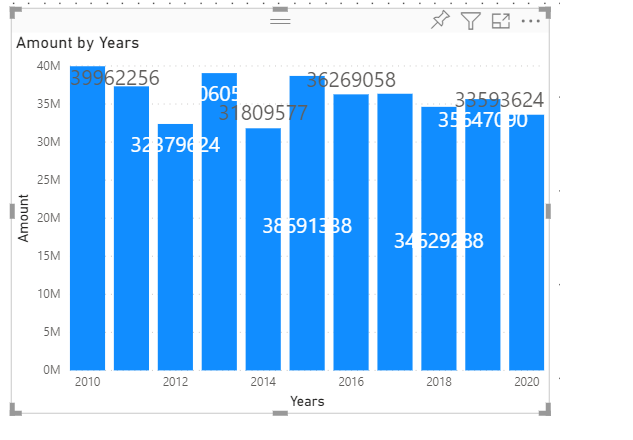
Power BI's native visuals (such as column chart) hide or shift the data labels very intelligently when they detect a collision.
hide.png
I want to implement the same in a custom visual, but don't seem to find any practical example

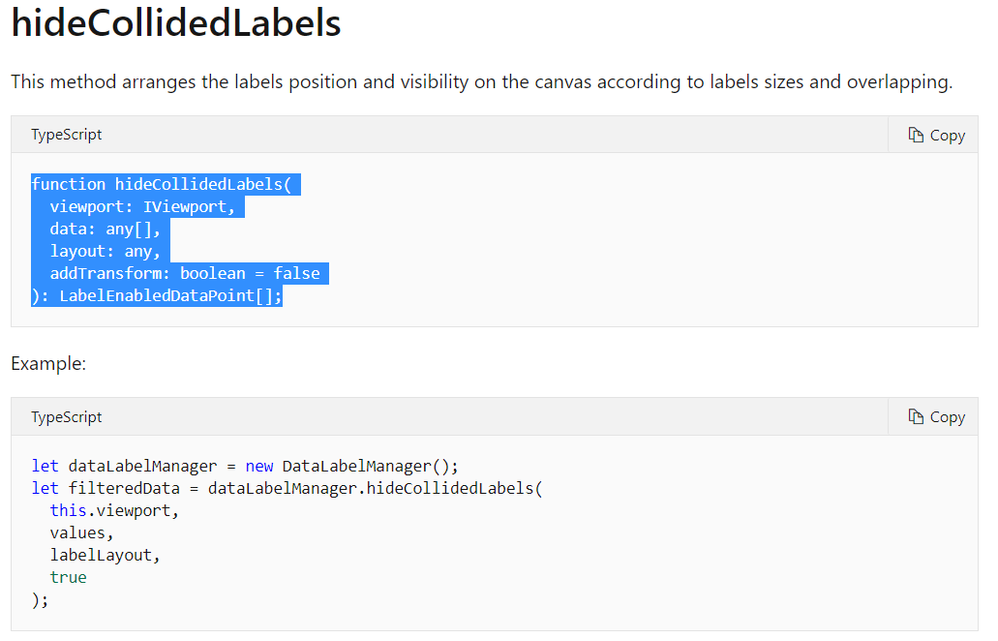
 I believe it has something to do with chartutils' ....dataLabelManager.hideCollidedLabels function as shown in image below
But I dont know how to implement this. For example what is lableLayout.

Could you guide me ?

CollidedLabels.png


1 REPLY 1
italodoliva
New Member

Hello, Zubair,


I'm wondering if you found an practical example of the hideCollideLabels implementation? I'm building a custom scatterplot and I want the category labels to rearrange in order not to overlap.


Regards,

Italo

Helpful resources

Announcements
April Power BI Update Carousel

Power BI Monthly Update - April 2026

Check out the April 2026 Power BI update to learn about new features.

New to Fabric survey Carousel

New to Fabric Survey

If you have recently started exploring Fabric, we'd love to hear how it's going. Your feedback can help with product improvements.

Power BI DataViz World Championships carousel

Power BI DataViz World Championships - June 2026

A new Power BI DataViz World Championship is coming this June! Don't miss out on submitting your entry.

FabCon and SQLCon Highlights Carousel

FabCon &SQLCon Highlights

Experience the highlights from FabCon & SQLCon, available live and on-demand starting April 14th.