Join us at FabCon Atlanta from March 16 - 20, 2026, for the ultimate Fabric, Power BI, AI and SQL community-led event. Save $200 with code FABCOMM.
Register now!View all the Fabric Data Days sessions on demand. View schedule
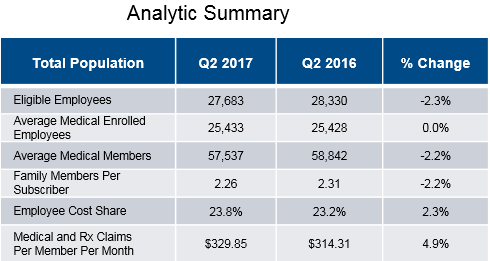
I'm trying to create a table like below in Power BI however its a bit more difficult than I expected.
Each of the Row labels is a measure and I have a date dimension to show the values. I also have the QoQ % Change measure.
Using a matrix or table hasn't worked, any help greatly appreciated.
You may try to use DAX to create a calculated table.
https://powerbi.microsoft.com/en-us/guided-learning/powerbi-learning-2-6-create-calculated-tables/
Thanks! I'll take a look and see how it all works.
Check out the November 2025 Power BI update to learn about new features.
Advance your Data & AI career with 50 days of live learning, contests, hands-on challenges, study groups & certifications and more!
| User | Count |
|---|---|
| 4 | |
| 2 | |
| 2 | |
| 1 | |
| 1 |