
cancel
Showing results for 
Search instead for 
Did you mean: 

The Power BI Data Visualization World Championships is back! It's time to submit your entry. Live now!

Reply
Anonymous
Not applicable

Getting failed to update Data source credentials error while trying to connect to Gateway.

Hi Team,


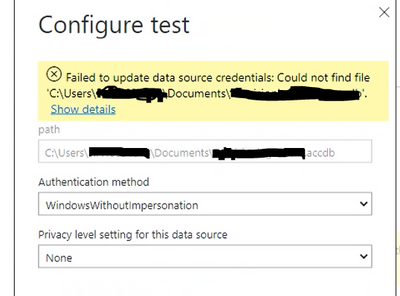
I'm building a report for which data source is Access Database. I've called the data via Access DB data source in Get data and built the report and published it in Power Bi service. But in data source credentials i'm getting error as "Could not find file" even the path is correct and file is available in that path. 


Kindly help to find me a solution for this. Besides I also want to know is it related to gateway connection and does Access DB support on-Permesis gateway?


HaveeshPerla_1_1-1652343271227.png


Regards,

Haveesh 

1 ACCEPTED SOLUTION
Anonymous
Not applicable

Hi @Anonymous ,

The Access database is supported by Gateway, you can find the details in this official documentation.

yingyinr_0-1652667124155.png

1 Supported with the ACE OLEDB provider, installed on the same machine as the gateway.

Regarding to your problem, please review the following link and check if it can resolve your problem.

On-premises data gateway error

A 64-bit version of the Access Database Engine 2010 OLEDB provider must be installed on your on-premises data gateway machine to be able to load Access database files. If you already have a 64-bit version of Microsoft Office installed on the same machine as the gateway, the Access Database Engine 2010 OLEDB provider is already installed. If not, you can download the driver from the following location:

https://www.microsoft.com/download/details.aspx?id=13255


Troubleshoot importing Access and Excel .xls files in Power BI Desktop

In addition, you can refer the following thread to add Access data source in the gateway.

Using MS Access as a data source with On-Premises Data Gateway

Best Regards

View solution in original post

1 REPLY 1
Anonymous
Not applicable

Hi @Anonymous ,

The Access database is supported by Gateway, you can find the details in this official documentation.

yingyinr_0-1652667124155.png

1 Supported with the ACE OLEDB provider, installed on the same machine as the gateway.

Regarding to your problem, please review the following link and check if it can resolve your problem.

On-premises data gateway error

A 64-bit version of the Access Database Engine 2010 OLEDB provider must be installed on your on-premises data gateway machine to be able to load Access database files. If you already have a 64-bit version of Microsoft Office installed on the same machine as the gateway, the Access Database Engine 2010 OLEDB provider is already installed. If not, you can download the driver from the following location:

https://www.microsoft.com/download/details.aspx?id=13255


Troubleshoot importing Access and Excel .xls files in Power BI Desktop

In addition, you can refer the following thread to add Access data source in the gateway.

Using MS Access as a data source with On-Premises Data Gateway

Best Regards

Helpful resources

Announcements
Power BI DataViz World Championships

Power BI Dataviz World Championships

The Power BI Data Visualization World Championships is back! It's time to submit your entry.

December 2025 Power BI Update Carousel

Power BI Monthly Update - December 2025

Check out the December 2025 Power BI Holiday Recap!

FabCon Atlanta 2026 carousel

FabCon Atlanta 2026

Join us at FabCon Atlanta, March 16-20, for the ultimate Fabric, Power BI, AI and SQL community-led event. Save $200 with code FABCOMM.