Join us at FabCon Atlanta from March 16 - 20, 2026, for the ultimate Fabric, Power BI, AI and SQL community-led event. Save $200 with code FABCOMM.
Register now!Vote for your favorite vizzies from the Power BI Dataviz World Championship submissions. Vote now!
Table1
Name | StartDate | EndDate |
Sprint 1 | 04/09/2022 14:50:47 | 11/09/2022 18:10:48 |
Sprint 2 | 11/09/2022 18:30:00 | 25/09/2022 00:00:00 |
Table2
Worklog | DateEntry | Time |
WorkLog1 | 06/09/2022 14:00:00 | 3h |
WorkLog2 | 11/09/2022 19:30:00 | 5h |
I would like to create a column in table 2 that is the name of the column in table 1.
The dateEntry sets the name if it is in the range between StartDate and EndDateTable 2
Like this.
Worklog | DateEntry | Time | Name |
WorkLog1 | 06/09/2022 14:00:00 | 3h | Sprint 1 |
WorkLog2 | 11/09/2022 19:30:00 | 5h | Sprint 2 |
I tried using the DAX below, but it doesn't work.
#GetNameSprint =
VAR currentValue = SELECTEDVALUE(Table2[DateEntry])
RETURN
CALCULATE(VALUES(Table1[Name]), FILTER(Table1, currentValue >= Table1 [StartDate] && currentValue <= Table1 [EndDate]))
How can I build a DAX that it works for this?
Solved! Go to Solution.
Hi @SeleneLindsay ,
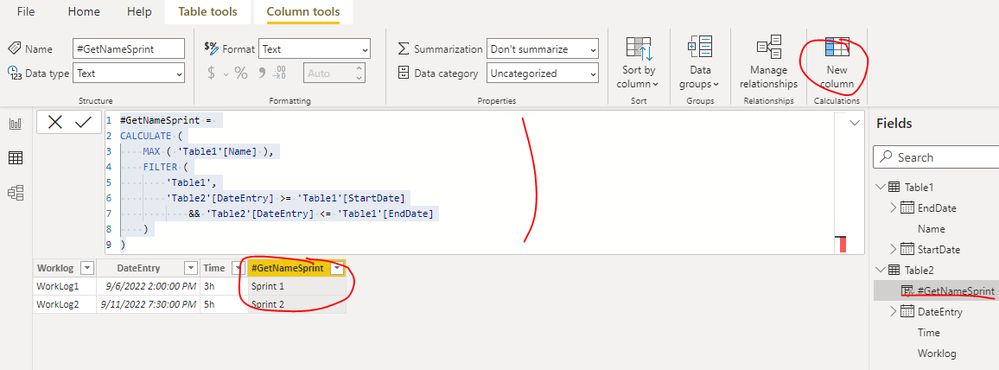
You can create a calculated column as below in Table2 to get it, please find the details in the attachment.
#GetNameSprint =
CALCULATE (
MAX ( 'Table1'[Name] ),
FILTER (
'Table1',
'Table2'[DateEntry] >= 'Table1'[StartDate]
&& 'Table2'[DateEntry] <= 'Table1'[EndDate]
)
)
Best Regards
Thanks! Thanks!
Hi @SeleneLindsay ,
You can create a calculated column as below in Table2 to get it, please find the details in the attachment.
#GetNameSprint =
CALCULATE (
MAX ( 'Table1'[Name] ),
FILTER (
'Table1',
'Table2'[DateEntry] >= 'Table1'[StartDate]
&& 'Table2'[DateEntry] <= 'Table1'[EndDate]
)
)
Best Regards
Vote for your favorite vizzies from the Power BI World Championship submissions!
If you love stickers, then you will definitely want to check out our Community Sticker Challenge!
Check out the January 2026 Power BI update to learn about new features.
| User | Count |
|---|---|
| 3 | |
| 2 | |
| 2 | |
| 2 | |
| 1 |
| User | Count |
|---|---|
| 6 | |
| 4 | |
| 3 | |
| 2 | |
| 2 |