Join us at FabCon Atlanta from March 16 - 20, 2026, for the ultimate Fabric, Power BI, AI and SQL community-led event. Save $200 with code FABCOMM.
Register now!View all the Fabric Data Days sessions on demand. View schedule
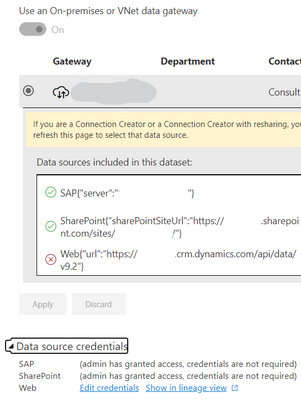
What does this 'red x' mean next to my Dynamics URL? It seems to indicate a credentials failure, but the refresh works and it pulls updated info into Power Query just fine. I am not sure what this is supposed to mean or how to fix it.
Solved! Go to Solution.
Hi @burtta - the red x should be okay. It indicates that the Connection will not require the Gateway to run because the Power BI can connect directly to the Web data. There might be caveat though. If you need to combine Gateway and Non-Gateway data in Power Query, you may need to create a connection within the Gateway to replace the Web credentials. This allows Power Query to combine the different data sources using the Data Gateway. This won't be necessary if the two data sources are loaded independently to the data model and then combined or related in the data model.
Check out the November 2025 Power BI update to learn about new features.
Advance your Data & AI career with 50 days of live learning, contests, hands-on challenges, study groups & certifications and more!
| User | Count |
|---|---|
| 4 | |
| 2 | |
| 2 | |
| 1 | |
| 1 |
| User | Count |
|---|---|
| 10 | |
| 10 | |
| 4 | |
| 3 | |
| 3 |