cancel
Showing results for 
Search instead for 
Did you mean: 

Learn from the best! Meet the four finalists headed to the FINALS of the Power BI Dataviz World Championships! Register now

Reply
lmirab
New Member

GA Connector showing different data

Hello there. 
I'm currently trying to create a dashboard that will recieve data from the google analytics connector from powerbi. The connector works fine, I can see all websites my account has access to and I can see all the query parameters, however when I try to make even a simple table, for example a table that has the "DATE "axis in the Time folder and "Users" in the User folder selected ( and no other metric selected ), the absolute numbers that are displayed on the table and what I can see from just accessing the browser interface of GA are different per day. Sometimes higher through the connector, sometimes lower but never the numbers matching.


Is there some reason as to why this happen? Is it possible to have some kind of filter applied to the browser version but not to the connector even when I'm looking at the exact same website?

1 ACCEPTED SOLUTION
Anonymous
Not applicable

HI @lmirab,

AFAIK, Power bi google analytics connector is pull data from google analytics API.
The connector does not live connected to the google analytics service, so the response data may not same as the values that you viewed on the web browser side.

In addition, google analytics API also include some limit and delay for usage, you can refer to the following link to know more about this:

Data limits for Universal Analytics properties - Analytics Help (google.com)

Regards,

Xiaoxin Sheng

View solution in original post

2 REPLIES 2
ReportBuilder07
Helper III
Helper III

Hi @lmirab I know this reply is very late lol but were you able to find a solution? As a workaround, maybe you can try to test your connection with a 3rd party connector. I use windsor.ai GA connector and before exporting to PBI I can filter the data by date range or select only the fields I need. In case you wonder, to make the connection first search for the GA connector in the data sources list:
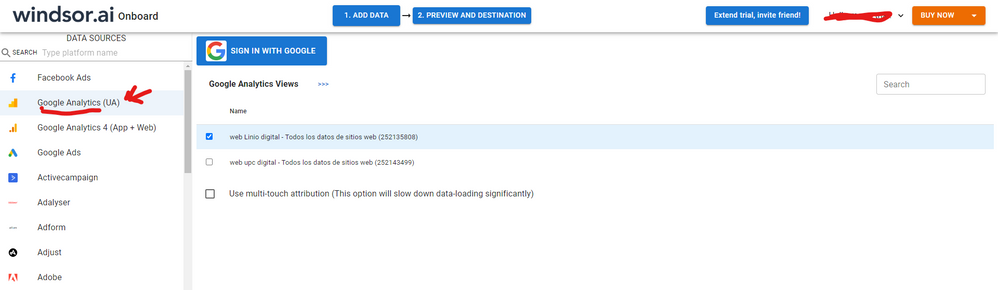
 

GA-1.png


After that, just grant access to your GA account using your credentials, then on preview and destination page you will see a preview of your GA fields:
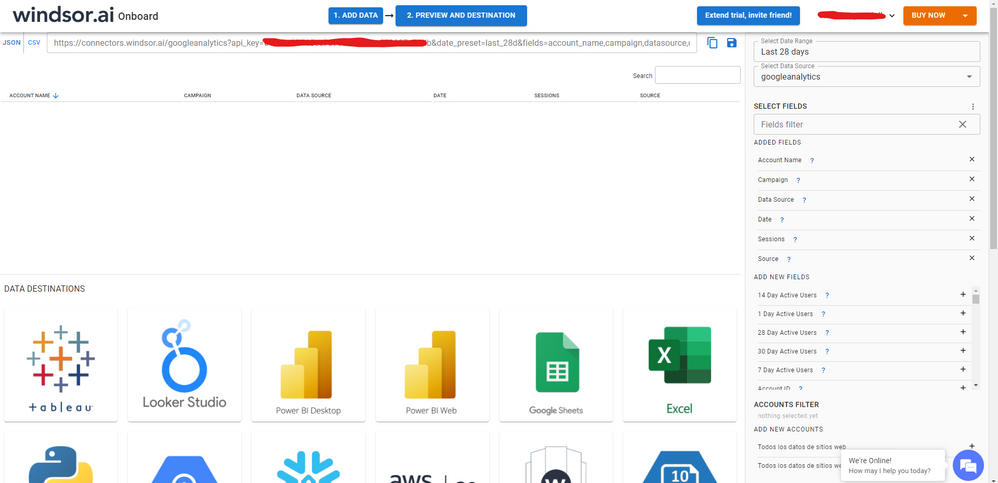
 

GA-2.png


There just select the fields you need. Finally, just select PBI as your data destination and finally just copy and paste the url on PBI --> Get Data --> Web --> Paste the url.


SELECT_DESTINATION_NEW.png

Anonymous
Not applicable

HI @lmirab,

AFAIK, Power bi google analytics connector is pull data from google analytics API.
The connector does not live connected to the google analytics service, so the response data may not same as the values that you viewed on the web browser side.

In addition, google analytics API also include some limit and delay for usage, you can refer to the following link to know more about this:

Data limits for Universal Analytics properties - Analytics Help (google.com)

Regards,

Xiaoxin Sheng

Helpful resources

Announcements
Power BI DataViz World Championships carousel

Power BI DataViz World Championships - June 2026

A new Power BI DataViz World Championship is coming this June! Don't miss out on submitting your entry.

Join our Fabric User Panel

Join our Fabric User Panel

Share feedback directly with Fabric product managers, participate in targeted research studies and influence the Fabric roadmap.

March Power BI Update Carousel

Power BI Community Update - March 2026

Check out the March 2026 Power BI update to learn about new features.