cancel
Showing results for 
Search instead for 
Did you mean: 

Join the FabCon + SQLCon recap series. Up next: Power BI, Real-Time Intelligence, IQ and AI, and Data Factory take center stage. All sessions are available on-demand after the live show. Register now

Reply
Anonymous
Not applicable

Fixing Dynamic Measure Slicer

I have built a measure slicer that is working almost as expected.

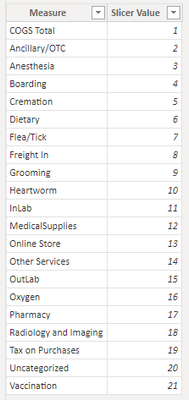
I started by creating a disconnected table with all of my measures:

BIDev4Life_0-1661435473363.png

I then created measures which reference the table to pick which one is displayed on a chart:


A Ancillary/OTC % of Rev = if(selectedvalue(slicertable[slicer value]) = 2 || isblank(selectedvalue(slicertable[slicer value])) ,[Ancillary/OTC % of Rev])


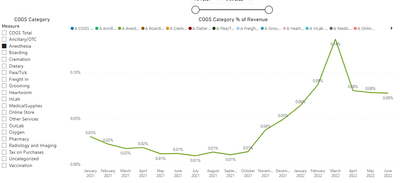
When a single measure is selected, the visual shows that single measure as expected:

BIDev4Life_1-1661435565574.png

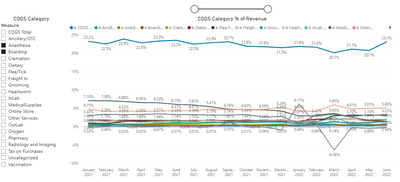
However, when selecting 2 or more measures, every measure is shown on the chart. It should only be showing those two measures: 

BIDev4Life_2-1661435607410.png

What am I missing here? Is it the DAX logic? Or the method I have used entirely? 

1 REPLY 1
Anonymous
Not applicable

Hi @Anonymous,

AFAIK, selectedvalue does not suitable to handle multiple selections, if you do not set 'alternate result' option it will return blank when you select multiple items.

For this sceaniro, I'd like to suggest adding a variable table with summarize function to do customized to handle each calculation and aggregate them.

SELECTEDVALUE function - DAX | Microsoft Docs

Regards,

Xiaoxin Sheng

Helpful resources

Announcements
April Power BI Update Carousel

Power BI Monthly Update - April 2026

Check out the April 2026 Power BI update to learn about new features.

New to Fabric survey Carousel

New to Fabric Survey

If you have recently started exploring Fabric, we'd love to hear how it's going. Your feedback can help with product improvements.

Power BI DataViz World Championships carousel

Power BI DataViz World Championships - June 2026

A new Power BI DataViz World Championship is coming this June! Don't miss out on submitting your entry.

FabCon and SQLCon Highlights Carousel

FabCon &SQLCon Highlights

Experience the highlights from FabCon & SQLCon, available live and on-demand starting April 14th.