
cancel
Showing results for 
Search instead for 
Did you mean: 

We've captured the moments from FabCon & SQLCon that everyone is talking about, and we are bringing them to the community, live and on-demand. Starts on April 14th. Register now

Reply
mgaynor
Helper I
Helper I

Exporting Power BI reports (using Automate)

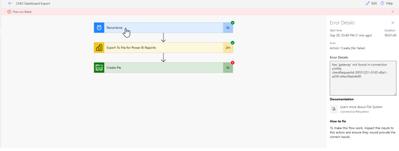
When attempting to export I’ve been able to export the file successfully but have received an error when attempting to save the file to a network folder. The error Message is 'Key 'gateway' not found in connection profile.'  What config step or obstacles are there in completing this flow?

Thanks,


mgaynor_0-1633700654890.png

mgaynor_4-1633700719645.png


2 REPLIES 2
Anonymous
Not applicable

Hi @mgaynor 

I think you may refer to this offical blog to learn how to export and email a power bi report with automate.

For reference:

Export and email a Power BI report with Power Automate


Best Regards,
Rico Zhou


If this post helps, then please consider Accept it as the solution to help the other members find it more quickly.

jaideepnema
Solution Sage
Solution Sage

Hi @mgaynor ,

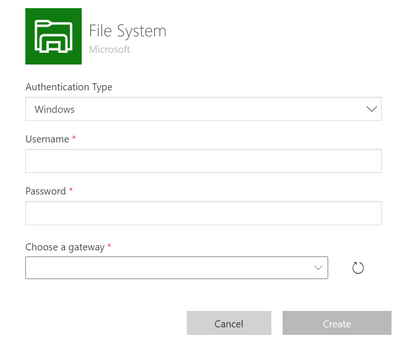
There seems to be some issue with your file system connector setup or it doesnt seems to be properly configured as this requires a On Premise Gateway to be setup as shown below:


jaideepnema_0-1633929869709.png

Here is the detailed article for your reference:

File System - Connectors | Microsoft Docs


Please accept this as a solution if your question has been answered !!

Appreciate a Kudos 😀


Helpful resources

Announcements
New to Fabric survey Carousel

New to Fabric Survey

If you have recently started exploring Fabric, we'd love to hear how it's going. Your feedback can help with product improvements.

Power BI DataViz World Championships carousel

Power BI DataViz World Championships - June 2026

A new Power BI DataViz World Championship is coming this June! Don't miss out on submitting your entry.

Join our Fabric User Panel

Join our Fabric User Panel

Share feedback directly with Fabric product managers, participate in targeted research studies and influence the Fabric roadmap.