cancel
Showing results for 
Search instead for 
Did you mean: 

Next up in the FabCon + SQLCon recap series: The roadmap for Microsoft SQL and Maximizing Developer experiences in Fabric. All sessions are available on-demand after the live show. Register now

Reply
MikeCSmith
Frequent Visitor

Excel Date imported as null by Source/Navigation

I am importing an excel data extract created by JIRA that contains dates in columns 6 through 10.  In stead of bringing these in as data/time or even text it converts the data to null (blank in the sheet 'Imported Sheet').  The underlying value in excel is a date/time serial number.  


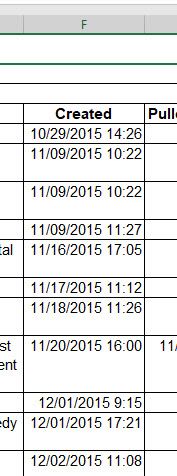
The data in the extract is       10/29/2015 14:26.  The underlying date serial number is 42306.60139.


I was hoping to attach a sample of the source extract and get data, but I don't see anywhere to attach a file to this post.


Here is the generated M code.

let
Source = Excel.Workbook(File.Contents("Z:\SYSPLAN\AssetMgt\Metric Workbook\Asset Management Support Metrics\Test Recs.xlsx"), null, true),
general_report1 = Source{[Name="general_report"]}[Data],
#"Changed Type" = Table.TransformColumnTypes(general_report1,{{"Column1", type text}, {"Column2", type text}, {"Column3", type text}, {"Column4", type text}, {"Column5", type text}, {"Column6", type text}, {"Column7", type text}, {"Column8", type text}, {"Column9", type text}, {"Column10", type text}, {"Column11", type text}})
in
#"Changed

2 REPLIES 2
v-jiascu-msft
Microsoft Employee
Microsoft Employee

Hi @MikeCSmith,


That's strange. You can upload your file to the cloud drive like OneDrive, GoogleDrive, then share the download link here. Please mask your private data first.


Best Regards,

Dale

Community Support Team _ Dale
If this post helps, then please consider Accept it as the solution to help the other members find it more quickly.

Our company policies will not let me post a file to the cloud outside of our firewall.  


This is a pic of the relevant data in the query preview window as a result of "Get Data From Workbook."


Get data from workbook result.jpg 


Here is a pic of the data I'm attempting to import.


Import Data.jpg


If I change the import file column format to 'General' then the data becomes a decimal date/time serial number and everything imports correctly.  But I want to avoid making the user modify anything in the extract data.

Helpful resources

Announcements
New to Fabric survey Carousel

New to Fabric Survey

If you have recently started exploring Fabric, we'd love to hear how it's going. Your feedback can help with product improvements.

Power BI DataViz World Championships carousel

Power BI DataViz World Championships - June 2026

A new Power BI DataViz World Championship is coming this June! Don't miss out on submitting your entry.

Join our Fabric User Panel

Join our Fabric User Panel

Share feedback directly with Fabric product managers, participate in targeted research studies and influence the Fabric roadmap.

March Power BI Update Carousel

Power BI Community Update - March 2026

Check out the March 2026 Power BI update to learn about new features.