cancel
Showing results for 
Search instead for 
Did you mean: 

Did you hear? There's a new SQL AI Developer certification (DP-800). Start preparing now and be one of the first to get certified. Register now

Reply
Richtpt
Helper I
Helper I

Error 429 Too Many Requests using Invoke-PowerBIRestMethod refreshes

I'm working on a DevOps Release Pipeline for Power BI.  It was working fine with the last piece being to refresh the dataset.  But now when I try it again I get error 429 TooManyRequests.  Nothing changed in my Pipeline. 


In my Powershell I use Connect-PowerBIServiceAccount -ServicePrincipal. 

Then Invoke-PowerBIRestMethod /Default.Takeover.

Then Invoke-PowerBIRestMethod /Default.UpdateParameters to change a parameter in the pbix report.

Then Invoke-PowerBIRestMethod /Default.BindToGateway.

Last Invoke-PowerBIRestMethod /refreshes.


If I run it again all the other Invoke-PowerBIRestMethod's work fine, I only get the 429 error on refreshes.  If I comment all the other Invoke's out and only have the refreshes method I still get the 429 error.  If I go to the workspace web page and refresh there it works fine.  I even copied the urls from the logs and pasted them in VSC to run them.  All of the other methods run fine but the refreshes url gives me the 429 error.


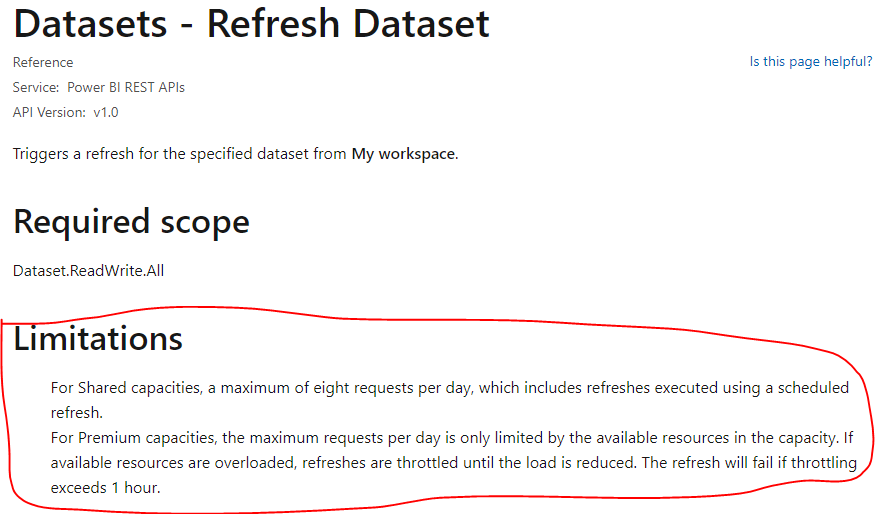
Can anyone give me more insight to what is going on with the refreshes method?  What am I doing that's too many requests?  Can I only issue the refreshes method a certain number of times per hour/day/dataset?  Is there a way to fix this, like a setting to change?


Thanks!

1 ACCEPTED SOLUTION
Anonymous
Not applicable

Hi @Richtpt ,

The HTTP 429 Too Many Requests response status code indicates the user has sent too many requests in a given amount of time. Please review the following threads which have the same problem with you, hope they can help you.

Streaming dataset - Error http 429

yingyinr_0-1637216288265.png

(429): Too Many Requests Error

yingyinr_1-1637216705805.png

Power BI - dataset refresh completion data PowerShell

Best Regards

View solution in original post

1 REPLY 1
Anonymous
Not applicable

Hi @Richtpt ,

The HTTP 429 Too Many Requests response status code indicates the user has sent too many requests in a given amount of time. Please review the following threads which have the same problem with you, hope they can help you.

Streaming dataset - Error http 429

yingyinr_0-1637216288265.png

(429): Too Many Requests Error

yingyinr_1-1637216705805.png

Power BI - dataset refresh completion data PowerShell

Best Regards

Helpful resources

Announcements
April Power BI Update Carousel

Power BI Monthly Update - April 2026

Check out the April 2026 Power BI update to learn about new features.

Fabric SQL PBI Data Days

Data Days 2026 coming soon!

Sign up to receive a private message when registration opens and key events begin.

New to Fabric survey Carousel

New to Fabric Survey

If you have recently started exploring Fabric, we'd love to hear how it's going. Your feedback can help with product improvements.

Power BI DataViz World Championships carousel

Power BI DataViz World Championships - June 2026

A new Power BI DataViz World Championship is coming this June! Don't miss out on submitting your entry.