cancel
Showing results for 
Search instead for 
Did you mean: 

The Power BI Data Visualization World Championships is back! Get ahead of the game and start preparing now! Learn more

Reply
nvgersdorff
Frequent Visitor

Embedded PowerBI mobile layout is blurry

Hello everyone,


we are facing an issue with embedded reports in mobile layout. The problem seems to be browser-dependent as this issue only happens on the iOS Version of our app, not on the android version. 


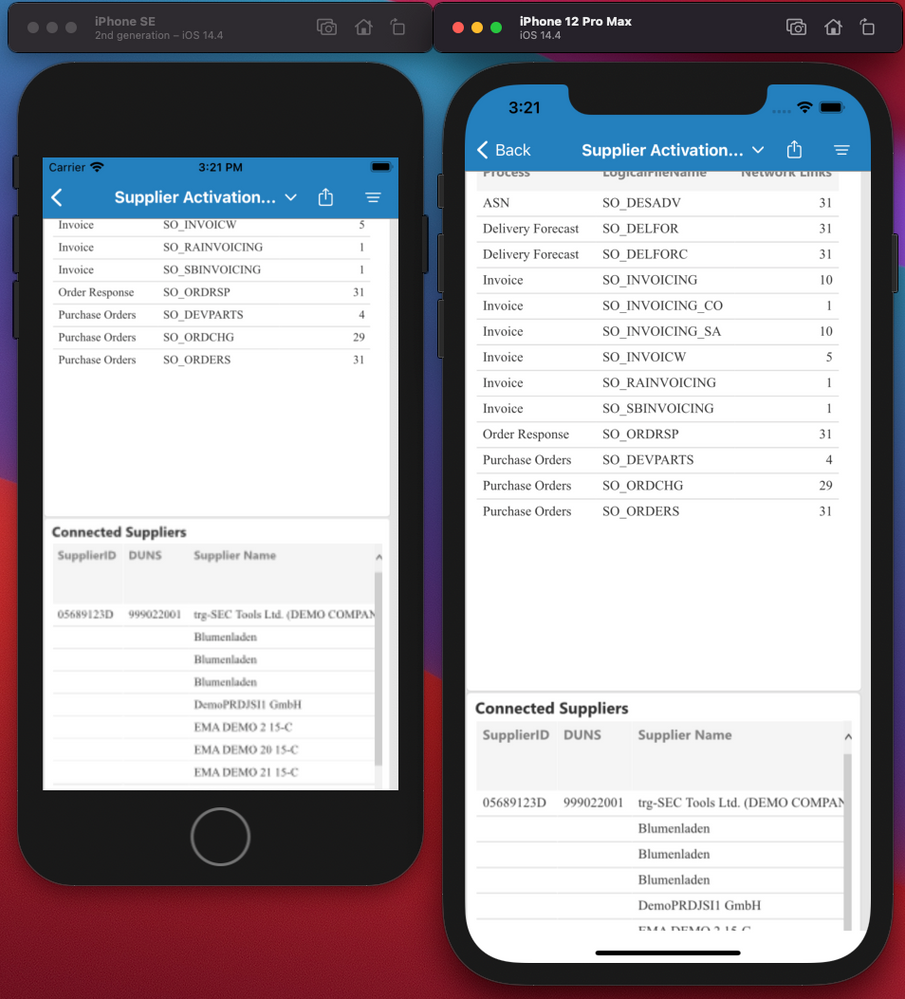
The problem is that the text is blurry in tables, especially in scrollable tables. The smaller the resolution of the device, the more blurry. Please see attached screenshot. Any idea how we can solve this?


We use the latest powerbi.js for embedding in native iOS and Android apps using respective webviews.


Kind regards

Nicolai


Upper table is sharp, lower (scrollable) is not sharpUpper table is sharp, lower (scrollable) is not sharp

3 REPLIES 3
gwuhm
Frequent Visitor

Hi @nvgersdorff 

did you found a solution? I have the same issue.


Thank you,

Pavel

gwuhm
Frequent Visitor

I found the answer - you need to define viewport
https://webhint.io/docs/user-guide/hints/hint-meta-viewport/

Anonymous
Not applicable

Hi @nvgersdorff ,

Please review the content in the following links, hope they can help you resolve the problem.

Integrated PowerApps text is blurry

Tips for Mobile Friendly Report Development with Power BI

Best Regards

Helpful resources

Announcements
Power BI DataViz World Championships

Power BI Dataviz World Championships

The Power BI Data Visualization World Championships is back! Get ahead of the game and start preparing now!

December 2025 Power BI Update Carousel

Power BI Monthly Update - December 2025

Check out the December 2025 Power BI Holiday Recap!

FabCon Atlanta 2026 carousel

FabCon Atlanta 2026

Join us at FabCon Atlanta, March 16-20, for the ultimate Fabric, Power BI, AI and SQL community-led event. Save $200 with code FABCOMM.