cancel
Showing results for 
Search instead for 
Did you mean: 

Learn from the best! Meet the four finalists headed to the FINALS of the Power BI Dataviz World Championships! Register now

Reply
Sendilnathan
New Member

Embedded Power BI Reports does not show complete data

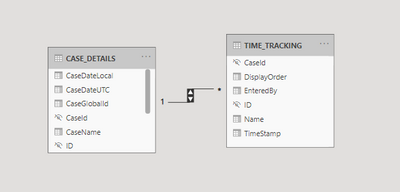
I have a report created with Direct Query with following models and relationship.

(1:* relationship with filter in both direction)

Sendilnathan_0-1623140361433.png


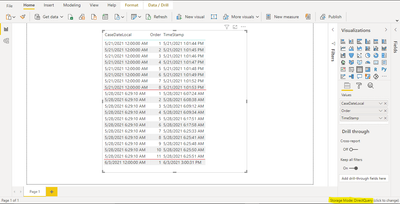
Am able to create a table visual with all rows from both table in Power BI desktop.

Sendilnathan_0-1623143796947.png


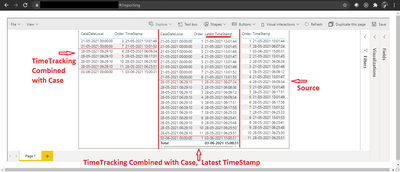
But when the same report published to Azure Power BI workspace and emedded into a web application does not show all data.

I can see data only

  • if columns are only from TimeTracking
  • if TimeStamp column is choosen with Latest or Earliest aggregation

 Sendilnathan_1-1623143846428.png


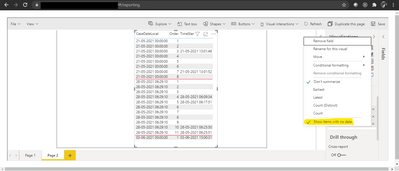
And If show items with no data is chosen, then rows are displayed with empty values as in below screenshots (2)

 Sendilnathan_0-1623144371999.png


Can someone help?


1 ACCEPTED SOLUTION
Sendilnathan
New Member

@V-lianl-msftThe issue resolved after changing Timestamp column datatype from DATETIME2 to DATETIME2(0)

View solution in original post

2 REPLIES 2
Sendilnathan
New Member

@V-lianl-msftThe issue resolved after changing Timestamp column datatype from DATETIME2 to DATETIME2(0)

V-lianl-msft
Community Support
Community Support

Hi @Sendilnathan ,


This may be caused by both filter direction of 1-*, which is usually filtered from 1 to *.

After trying to change the filtering direction, see if the problem still exists.


Best Regards,
Liang
If this post helps, then please consider Accept it as the solution to help the other members find it more quickly.

Helpful resources

Announcements
Join our Fabric User Panel

Join our Fabric User Panel

Share feedback directly with Fabric product managers, participate in targeted research studies and influence the Fabric roadmap.

February Power BI Update Carousel

Power BI Monthly Update - February 2026

Check out the February 2026 Power BI update to learn about new features.

FabCon Atlanta 2026 carousel

FabCon Atlanta 2026

Join us at FabCon Atlanta, March 16-20, for the ultimate Fabric, Power BI, AI and SQL community-led event. Save $200 with code FABCOMM.