cancel
Showing results for 
Search instead for 
Did you mean: 

Next up in the FabCon + SQLCon recap series: The roadmap for Microsoft SQL and Maximizing Developer experiences in Fabric. All sessions are available on-demand after the live show. Register now

Reply
bbeach
New Member

Embedded PBI with RLS connects but only shows loading icon

I've got an app I've integrated with Power BI Embedded using RLS. I followed all the steps in Microsoft's documentation for App Owns Data, and everything appears to be connecting. However, the report iframe just sits with the loading icon.


I've checked the app, dev console, etc. for errors, but it doesn't throw any. The report loads fine within PBI itself, and everything seems to have a green light for connectivity between my client's app and PBI. I just can't get the report to actually load.

I've gone through Microsoft's setup and demo project dozens of times at this point to make sure I didn't miss anything as well as the Troubleshooting guide several times. I even left the report "loading" for about 90 minutes while I was researching to no avail.


I'm obviously overlooking something, so any help would be very much appreciated.


Thanks!

3 REPLIES 3
Anonymous
Not applicable

Hi  @bbeach ,


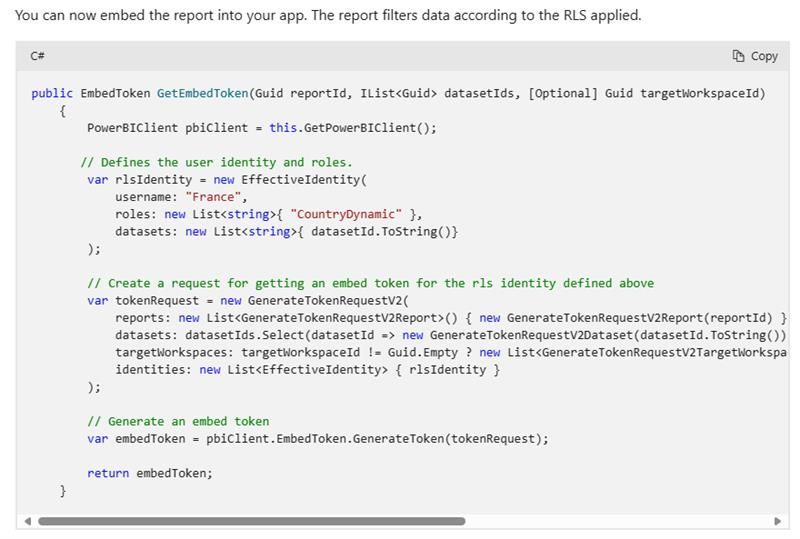
Regarding your specific error description "the report iframe just sits with the loading icon". Can you provide a screenshot of the error for my detailed reference and study? Also, have you tried to refer to this official document for RLS configuration and embed token generation?

Using standard cloud based row-level security with embedded content in Power BI embedded analytics -...

vyangliumsft_0-1710835372756.jpeg


Best Regards,

Liu Yang

If this post helps, then please consider Accept it as the solution to help the other members find it more quickly.


Hey - I am having the exact same issue. 


I have attached a screenshot below of my localhost:3000 when I reploy a React Application that uses the Power BI Embed URL I generate from a cert-based SPN auth flow using ConfidentialClientApplicationBuilder in DotNEt. 


You can see from the response that I am getting no console errors or issues with authentication [from what I can tell]. 

Screenshot 2024-05-14 224312.png

No error is thrown, so I'm unable to give a screenshot.  The app returns 200 (HTML response) when it attempts to load the report, so that leads me to believe it's getting a good response back from Power BI.


I did follow the official documentation to set up RLS and token generation.  Aside from renaming a couple of variables, I basically copied the setup you posted.  The token data works successfully in the Power BI Playground.

Helpful resources

Announcements
New to Fabric survey Carousel

New to Fabric Survey

If you have recently started exploring Fabric, we'd love to hear how it's going. Your feedback can help with product improvements.

Power BI DataViz World Championships carousel

Power BI DataViz World Championships - June 2026

A new Power BI DataViz World Championship is coming this June! Don't miss out on submitting your entry.

Join our Fabric User Panel

Join our Fabric User Panel

Share feedback directly with Fabric product managers, participate in targeted research studies and influence the Fabric roadmap.

March Power BI Update Carousel

Power BI Community Update - March 2026

Check out the March 2026 Power BI update to learn about new features.