Get Fabric or SQL Certified for Free.
Get certified for free when you join Fabric Data Days 2026 and dive into Fabric, Power BI, SQL, AI, and other essential data skills.
Join now- Power BI forums
- Get Help with Power BI
- Desktop
- Service
- Report Server
- Power Query
- Mobile Apps
- Developer
- DAX Commands and Tips
- Custom Visuals Development Discussion
- Health and Life Sciences
- Power BI Spanish forums
- Translated Spanish Desktop
- Training and Consulting
- Instructor Led Training
- Dashboard in a Day for Women, by Women
- Galleries
- Data Stories Gallery
- Themes Gallery
- Contests Gallery
- QuickViz Gallery
- Quick Measures Gallery
- Visual Calculations Gallery
- Fabric Apps Gallery
- Notebook Gallery
- Translytical Task Flow Gallery
- TMDL Gallery
- R Script Showcase
- Webinars and Video Gallery
- Ideas
- Custom Visuals Ideas (read-only)
- Issues
- Issues
- Events
- Upcoming Events
July 28 - August 9 | Final Round of the Power BI Dataviz World Championships. This is your chance. Learn more
- Power BI forums
- Forums
- Get Help with Power BI
- Developer
- Re: Embed Power reports in Salesforce using LWC
- Subscribe to RSS Feed
- Mark Topic as New
- Mark Topic as Read
- Float this Topic for Current User
- Bookmark
- Subscribe
- Printer Friendly Page

- Mark as New
- Bookmark
- Subscribe
- Mute
- Subscribe to RSS Feed
- Permalink
- Report Inappropriate Content
Embed Power reports in Salesforce using LWC
Hello Team,
I had a use-case where we had to embed the PowerBI reports into the salesforce org using LWC.
I did a POC which involved deploying an open source project built by Microsoft (https://github.com/PowerBiDevCamp/SalesforceAppOwnsDataEmbedding)
I am facing few issues :
1. OnLoad of the component, i face multiple javascript pop-up errors, for around 4-5 times, and after that the report is loaded into the lwc component.
After a thorough debugging, i found the issue is from the powerbi.js static resource which we uploaded.
Has any body faced this issue?
Is there any way i can get rid of these javascript error pop-ups?
Attaching screenshots for reference.
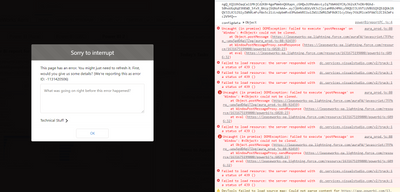
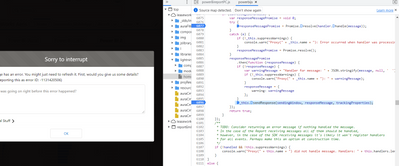
Solved! Go to Solution.
- Mark as New
- Bookmark
- Subscribe
- Mute
- Subscribe to RSS Feed
- Permalink
- Report Inappropriate Content
Hi @Anonymous,
I think these should be more related to the LWC limitations, you can check the below link of limitations if they meet your scenario:
Supported Salesforce Targets and Tools - Salesforce Lightning Component Library
Regards,
Xiaoxin Sheng

- Mark as New
- Bookmark
- Subscribe
- Mute
- Subscribe to RSS Feed
- Permalink
- Report Inappropriate Content
Hii
How we can hide filters section of powerBi reports on lwc component??

- Mark as New
- Bookmark
- Subscribe
- Mute
- Subscribe to RSS Feed
- Permalink
- Report Inappropriate Content
Hello
I am referring same GITHub code for embedding power bi report in salesforce. But i need to append filter in the URL. I tried this link Filter a report using query string parameters in the URL - Power BI | Microsoft Docs. But I am unable to get power bi report in salesforce. Please guide. Thanks in advance.

- Mark as New
- Bookmark
- Subscribe
- Mute
- Subscribe to RSS Feed
- Permalink
- Report Inappropriate Content
<apex:page showHeader="true" standardStylesheets="false" >
<h1>Power BI User Owns Data Embed PowerBI w. Parameter Example - ikleiner</h1>
<iframe
width="1200"
height="720"
src="https://ec2-52-54-65-73.compute-1.amazonaws.com/index.html?table=Geo&column=State&value=FL&reportId=ca1b2314-46ea-4de8-83ef-921c006a6fe2"
frameborder="0"
allowFullScreen="true">
</iframe>
</apex:page>
- Mark as New
- Bookmark
- Subscribe
- Mute
- Subscribe to RSS Feed
- Permalink
- Report Inappropriate Content
let clientId = "8eee109b-30a5-40d7-9f80-d1743745266b";
let tenant = "019dd3cd-6d48-4d28-aafc-00f1ea5bf100";
let authority = "https://login.microsoftonline.com/" + tenant;
const msalConfig = {
auth: {
clientId: clientId,
authority: authority,
},
cache: {
cacheLocation: "localStorage",
storeAuthStateInCookie: false,
},
system: {
allowRedirectInIframe: true,
asyncPopups: true
}
};
const loginScopes = {
scopes: [
"openid",
"profile",
"email",
"https://analysis.windows.net/powerbi/api/Report.Read.All",
]
};
const requestScopes = {
scopes: [
"https://analysis.windows.net/powerbi/api/Report.Read.All",
]
};
$(async function () {
const params = new URLSearchParams(window.location.search)
let reportId = params.get("reportId");
if (!reportId) {
DisplayError("!!The report is not configured with a valid report ID.");
return;
}
let aadApplication = new msal.PublicClientApplication(msalConfig);
// check if there is a cached identity for user
const currentAccounts = aadApplication.getAllAccounts();
if (currentAccounts.length > 0) {
// user identity found - get access token and embed report
accountId = currentAccounts[0].homeAccountId;
let tokenRequest = requestScopes;
tokenRequest.account = accountId;
let tokenResponse = await aadApplication.acquireTokenSilent(tokenRequest);
EmbedReport(tokenResponse.accessToken, reportId);
}
else {
// user identity not found - show Sign-in button added xfilter
$("#signin").click(async function () {
let aadApplication = new msal.PublicClientApplication(msalConfig);
aadApplication.loginPopup(loginScopes)
.then(function (response) {
EmbedReport(response.accessToken, reportId);
})
.catch(function (error) {
DisplayError("!User login was not successful. Please try again.");
});
});
$("#toolbar").show();
}
});
let EmbedReport = function (token, reportId) {
$("#toolbar").hide();
$("#error-panel").hide();
let padding = 8;
$("#report-container")
.width(window.innerWidth - padding)
.height(window.innerHeight - padding);
$("#loading")
.width(window.innerWidth - padding)
.height(window.innerHeight - padding)
.show();
let models = window["powerbi-client"].models;
//ikleiner
//make sure you retype 'single quotes' if you copied from somewhere else
//added ikleiner 8/29/22
//let xfilter = params.get("filter");
//let xtable = params.get("table");
//let xcolumn = params.get("column");
//let xvalue = params.get("value");
const params2 = new URLSearchParams(window.location.search)
let xtable = params2.get("table");
let xcolumn = params2.get("column");
let xvalue = params2.get("value");
window.alert("<<table: >> "+xtable+ "<< column: >> "+xcolumn+"<<value: >>"+xvalue+"<<reportId: >>"+reportId );
//let xtable = 'Geo';
//let xcolumn = 'State';
//let xvalue = 'NJ'
const Filter1 = {
$schema: "http://powerbi.com/product/schema#advanced",
target: {
table: xtable,
column: xcolumn
},
operator: "Eq",
values: [xvalue]
}
const Filter2 = {
$schema: "http://powerbi.com/product/schema#advanced",
target: {
table: xtable,
column: xcolumn
},
operator: "Eq",
values: [xvalue]
}
//modified filters: to pass basicFilter construct 8-31-22 ikleiner
reportLoadConfig = { type: "report",
id: reportId,
embedUrl: "https://app.powerbi.com/reportEmbed",
accessToken: token,
tokenType: models.TokenType.Aad,
filters: [Filter1], //filter array here -can add multiple blocks like [filter1, filter2]
settings: {
filterPaneEnabled: true,
navContentPaneEnabled: false,
personalBookmarksEnabled: true,
panes: {
bookmarks: { visible: true },
pageNavigation: { visible: true }
}
}
};
let reportContainer = document.getElementById("report-container");
let report = powerbi.embed(reportContainer, reportLoadConfig);
//Add filter to the report
report.on("loaded", function () {
$("#loading").hide();
$("#report-container").show();
});
report.on("error", function (error) {
console.log(error.detail.detailedMessage);
DisplayError(error.detail.detailedMessage);
$("#loading").hide();
});
}
let DisplayError = function (msg) {
$("#error-panel")
.text("Error: " + msg)
.show();
}
- Mark as New
- Bookmark
- Subscribe
- Mute
- Subscribe to RSS Feed
- Permalink
- Report Inappropriate Content
hi @Anonymous can you please provide how to you solve this issue as i am also working on the same and my requirement is to embeded power bi report in lwc it would be very helpful
thanks
Rahul Singh Yadav
- Mark as New
- Bookmark
- Subscribe
- Mute
- Subscribe to RSS Feed
- Permalink
- Report Inappropriate Content
Hi I got the Solution it can be implemented using visualFore Page and by Using Remote@RemoteAction in the apex class and thet VF page can be embeded in LWc component
<apex:page controller="PowerBiEmbedManager" >
<html>
<head>
</head>
<apex:includeScript value="{! $Resource.powerbijs }"/>
<apex:form >
<apex:pageBlock >
<apex:actionFunction name="refreshAccessToken" action="{!getEmbeddingDataForReport}"/>
</apex:pageBlock>
</apex:form>
<div id="myReport" style="height: 2000px;"/>
<script>
Visualforce.remoting.Manager.invokeAction(
'{!$RemoteAction.PowerBiEmbedManager.getEmbeddingDataForReport}',
function(result,event)
{
if(result.embedUrl && result.embedToken){
let reportContainer = document.getElementById('myReport');
let reportId = result.reportId;
let embedUrl = result.embedUrl;
let token = result.embedToken;
let config = {
type: 'report',
id: reportId,
embedUrl: embedUrl,
accessToken: token,
tokenType: 1,
settings: {
panes: {
filters: { expanded: false, visible: false },
pageNavigation: { visible: false }
}
}
};
// Embed the report and display it within the div container.
let report = powerbi.embed(reportContainer, config);
}
})
</script>
</html>
</apex:page>
- Mark as New
- Bookmark
- Subscribe
- Mute
- Subscribe to RSS Feed
- Permalink
- Report Inappropriate Content
Hi @Anonymous,
I think these should be more related to the LWC limitations, you can check the below link of limitations if they meet your scenario:
Supported Salesforce Targets and Tools - Salesforce Lightning Component Library
Regards,
Xiaoxin Sheng
Helpful resources

FabCon & SQLCon – Barcelona 2026
Join us in Barcelona for FabCon and SQLCon, the Fabric, Power BI, SQL, and AI community event. Save €200 with code FABCMTY200.

Fabric Community Sticker Challenge - Barcelona 2026
If you love stickers, then you will definitely want to check out our community sticker challenge, Barcelona edition!

Power BI Monthly Update - July 2026
Check out the July 2026 Power BI update to learn about new features.

Power BI DataViz World Championships - June 2026
A new Power BI DataViz World Championship is coming this June! Don't miss out on submitting your entry.

| User | Count |
|---|---|
| 2 | |
| 1 | |
| 1 | |
| 1 | |
| 1 |


| User | Count |
|---|---|
| 4 | |
| 2 | |
| 1 | |
| 1 | |
| 1 |


