Don't miss your chance to take the Fabric Data Engineer (DP-600) exam for FREE! Find out how by attending the DP-600 session on April 23rd (pacific time), live or on-demand.
Learn moreNext up in the FabCon + SQLCon recap series: The roadmap for Microsoft SQL and Maximizing Developer experiences in Fabric. All sessions are available on-demand after the live show. Register now
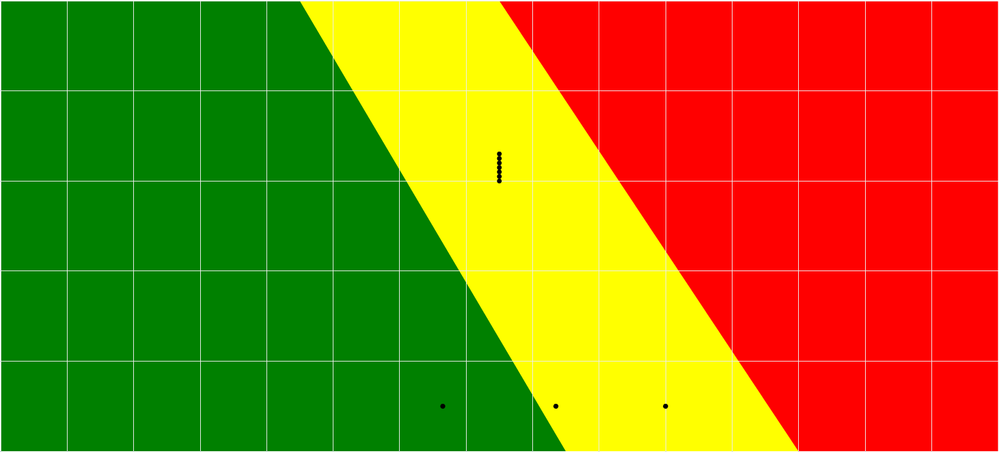
Is there any mecahanism that would allowing to create a dynamic background for a chart? The background might look like this:
Any idea?
Thanks
Solved! Go to Solution.
@Markzolotoy uh, you might be able to leverage "R" visuals. There is a whole lot there that I haven't explored yet. They just spun up a new gallery to showcase reports. But I'd look there for dynamically building some background, if you don't want a static image...
You could add image from the Format pane, select Plot Area> Add Image
Can I generate background chart at the runtime?
@Markzolotoy If I understand what you want by "Dynamic" you could use the "Image Viewer" - custom visual to set the background. Then, as you select different slicer options the background image would change depending on what image you have in your data set. I've used this before, and it works really well.
So, bottom line is that an image has to exist, I cannot draw a backgound at runtime, correct?
@Markzolotoy uh, you might be able to leverage "R" visuals. There is a whole lot there that I haven't explored yet. They just spun up a new gallery to showcase reports. But I'd look there for dynamically building some background, if you don't want a static image...
If you have recently started exploring Fabric, we'd love to hear how it's going. Your feedback can help with product improvements.
A new Power BI DataViz World Championship is coming this June! Don't miss out on submitting your entry.
Share feedback directly with Fabric product managers, participate in targeted research studies and influence the Fabric roadmap.
| User | Count |
|---|---|
| 1 | |
| 1 | |
| 1 | |
| 1 | |
| 1 |