This time we’re going bigger than ever. Fabric, Power BI, SQL, AI and more. We're covering it all. You won't want to miss it.
Learn moreDid you hear? There's a new SQL AI Developer certification (DP-800). Start preparing now and be one of the first to get certified. Register now
Hi,
I have a requirement to create a report with a Matrix visual, showing all detail columns coming from dimensions and the measure needs to be filtered to last 7 days from the selected slicer date based on grouping on a column from dimension.
SQL query needs to be achieved in Power BI:
SELECT Col1, COUNT(*) from Tab where Date > MIN(Slicer Date) and Date <= MAX(Slicer Date) group by Col1
Matrix Visual contains:
Dim1Col1, DIM2col2,Fact1Col1,Fact1Col2,Dim3Col1,Measure1,Measure2,Measure3,Measure4,Measure5
Measure1 : DAX converted from above SQL Query
Measure2: If (SQL Query Result) > 1, 1,0
Measure3: Measure1/Measure2
Measure4: If(SQL Query Result) =1,1,0)
Measure5: Measure4/Measure1
The Dax query with Measure as filter and using same logic to calculate the measure with ALLEXCEPT was working with flat table structure but once I converted to Modelling its not working, the visual never load. My Dim tables are large with 1M records and fact table has only 5K records.
The old logic doesnt work with even just 1000 records in everything.
It would be a great if any one could help me with this, struggling since a while now.
Thanks a ton in advance
I have already tried the approach of
Solved! Go to Solution.
Hi @Anonymous
I think you can make a filter measure for your column.
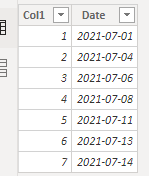
Sample:
Build an unrelated Date Table:
Date = CALENDAR(DATE(2021,07,01),DATE(2021,07,14))
Filter Measure:
Filter Measure =
VAR _MaxDate = SELECTEDVALUE('Date'[Date])
VAR _MinDate = SELECTEDVALUE('Date'[Date]) - 7
VAR _Filter = IF(MAX(Tab[Date])> _MinDate&&MAX(Tab[Date])<=_MaxDate,1,0)
return
_Filter
Add this measure into page level filter field in your Matrix.
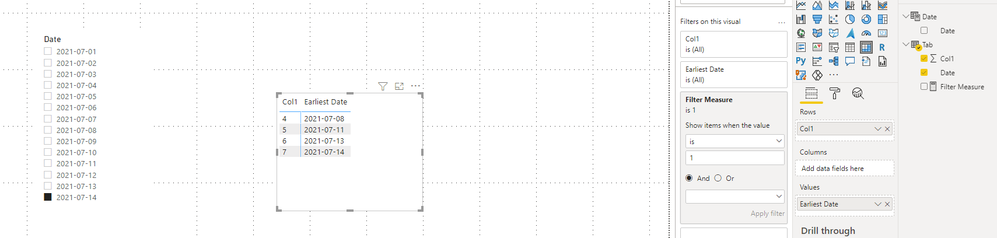
If i select 2021/07/14 in slicer, I should get results between 2021/07/08 and 2021/07/14.
Result:
Best Regards,
Rico Zhou
If this post helps, then please consider Accept it as the solution to help the other members find it more quickly.
Hi @Anonymous
I think you can make a filter measure for your column.
Sample:
Build an unrelated Date Table:
Date = CALENDAR(DATE(2021,07,01),DATE(2021,07,14))
Filter Measure:
Filter Measure =
VAR _MaxDate = SELECTEDVALUE('Date'[Date])
VAR _MinDate = SELECTEDVALUE('Date'[Date]) - 7
VAR _Filter = IF(MAX(Tab[Date])> _MinDate&&MAX(Tab[Date])<=_MaxDate,1,0)
return
_Filter
Add this measure into page level filter field in your Matrix.
If i select 2021/07/14 in slicer, I should get results between 2021/07/08 and 2021/07/14.
Result:
Best Regards,
Rico Zhou
If this post helps, then please consider Accept it as the solution to help the other members find it more quickly.
Check out the April 2026 Power BI update to learn about new features.
Sign up to receive a private message when registration opens and key events begin.
If you have recently started exploring Fabric, we'd love to hear how it's going. Your feedback can help with product improvements.