Good day,
I've used other BI tools but am relatively new to Power BI. Here's my challenge.
- I'm working with Education data where my Attendnace fact table stores a record every day a student is absent.
- I'm trying to create dynamic groups that calculate the range that a student falls in.
- These ranges will have to be updated depending on what school year, grade, subject, etc is filtered on.
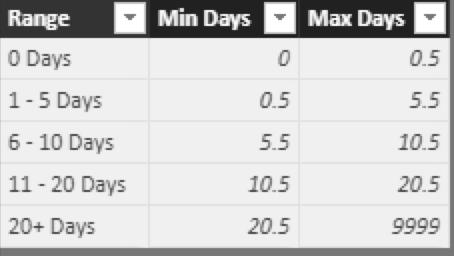
- The ranges are 0 days, 1-5 days, 6-10 days, 11-20 Days, 20+ Days
I created a lookup table that can be used in the calculation.
Elementary Attendance Days Absent Range
Here's the DAX expression I'm trying to use. Note that [Elementary Attendance Students] is a distinct count of student numbers.
Days Absent Range =
VAR AgeRangeDimension = VALUES('D: Student'[OEN])

RETURN
CALCULATE ([Elementary Attendance Students],
    FILTER ( AgeRangeDimension,
        COUNTROWS(
            FILTER('Elementary Attendance Days Absent Range',
                RANKX( ALL   ('D: Student'[OEN] ), 'M: Elementary Attendance'[Days Absent], , DESC ) > 'Elementary Attendance Days Absent Range'[Min Days]
                && RANKX(ALL ('D: Student'[OEN] ), 'M: Elementary Attendance'[Days Absent], , DESC ) <= 'Elementary Attendance Days Absent Range'[Max Days] ) ) > 0
            )
        )
When I use this column in a dashboard, I just get the value of large number which I beliegve is just summing all of the stduents. Here are the questions that I'm hoping you can help with.
- What do I need to do to in the expression above to return the Range column from the lookup table? Ideally I'd like to see 1 - 5 Days, 6 - 10 Days, etc returned.
- Should this calculation be a column or measure?
- Does it matter if the calculation above exits in the fact table or should I create it in a standalone table?
Thanks a lot for your help;
Dave


