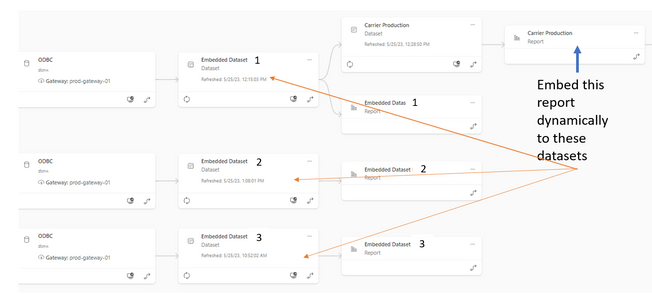
I am working on a project to embed a report into our website. I have one dataset per customer and I want to dynmaically bind the report to the dataset at the time of embed.
My report has a dataset associated with it and this dataset connects to one of the customers' datasets via direct query. I am trying to generate the embed token using Powershell with the method described here.
$bodyUser = [PSCustomObject]@{
    datasets = @(
        [PSCustomObject]@{
            id = "xxxxxxxx-report-dataset"
            xmlaPermissions = "ReadOnly"
        },
        [PSCustomObject]@{
            id = "xxxxxxxx-custer-dataset1"
            xmlaPermissions = "ReadOnly"
        },
        [PSCustomObject]@{
            id = "xxxxxxxx-custer-dataset2"
            xmlaPermissions = "ReadOnly"
        }
    )
    reports = @(
        [PSCustomObject]@{
            id = "xxxxxxxx-reportID"
        }
    )
    datasourceIdentities = @(
        [PSCustomObject]@{
            datasources = @(
                [PSCustomObject]@{
                    datasourceSelector = [PSCustomObject]@{
                        datasourceType = "ODBC"
                    }
                    connectionDetails = [PSCustomObject]@{
                        connectionString = "dsn=akpidatalake"
                        datasourceId = "xxxxxxxxxxx"
                        gatewayId = "xxxxxxxxxxx"
                    }
                },
                [PSCustomObject]@{
                    datasourceType = "AnalysisServices"
                    connectionDetails = [PSCustomObject]@{
                        server = "powerbi://api.powerbi.com/v1.0/myorg/embedded_poc"
                        database = "embedded dataset kap"
                    }
                    datasourceId = "xxxxxxxxxxx"
                    gatewayId = "xxxxxxxxxxx"
                }
            )
        }
    )
}

$jsonBody = $bodyUser | ConvertTo-Json -Depth 10
I am getthing this error:
Encountered errors when invoking the command: { "code": "InvalidRequest", "message": "Datasource identity must contain identity blob" }
Where do I get the indentity blob?