This is best Fabric, Power BI, SQL and AI community event. How do we know? The last event sold out! Save €200 with code FABCMTY200.
Register nowA new Data Days event is coming soon! This time we’re going bigger than ever. Fabric, Power BI, SQL, AI and more. Don't miss out.
Hi everyone,
I inserted drilldown option in my custom bar visual through capabilities.
Is it possible to drilldown by click on bar?
If it is not available in API, how can I acces drilldown level in code?
Regards,
Yerkhan
Yes, it's possbile. You just need to implement Selection via SelectionManager.
Ignat Vilesov,
Software Engineer
Microsoft Power BI Custom Visuals
I've noticed, that described functionality already supports in regular stacked column chart. However, due to design, data entry and tooltips functionality, this visual not suitable for me. So, how can I achieve same functionality?
Regards,
Yerkhan
To support drill down you just need to add drilldown into capabilities.json and SelectionManager.
Ignat Vilesov,
Software Engineer
Microsoft Power BI Custom Visuals
I implemented drilldown in capabilities. However, I find it hard to set selection manager for hierarchy levels. Can I send code for examination and pointing my mistakes in selection manager?
Regards,
Yerkhan
Yes, sure. Please send source code to pbicvsupport@microsoft.com
Ignat Vilesov,
Software Engineer
Microsoft Power BI Custom Visuals
Thanks. So, if I implement selection manager, it will drill down automatically? Or should I set appropriate hierarchy level in code?
Also, I have slicers for every hierarchy level: categories for level 1, 2 and etc. How to set drill down if slicer for level 1 is used?
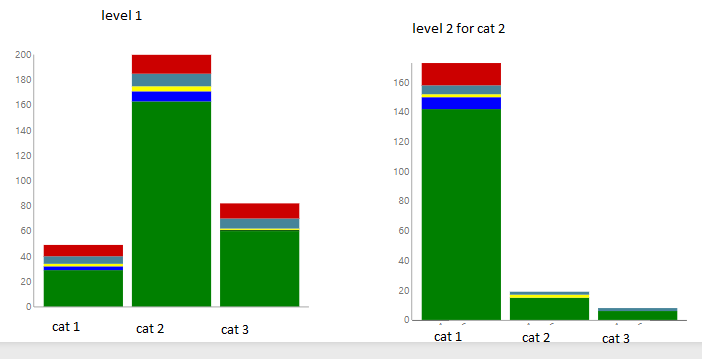
So, it will look something like this:
Regards,
Yerkhan
Check out the May 2026 Power BI update to learn about new features.
Sign up to receive a private message when registration opens and key events begin.
If you have recently started exploring Fabric, we'd love to hear how it's going. Your feedback can help with product improvements.