Join us at FabCon Atlanta from March 16 - 20, 2026, for the ultimate Fabric, Power BI, AI and SQL community-led event. Save $200 with code FABCOMM.
Register now!The Power BI Data Visualization World Championships is back! It's time to submit your entry. Live now!
Hello All,
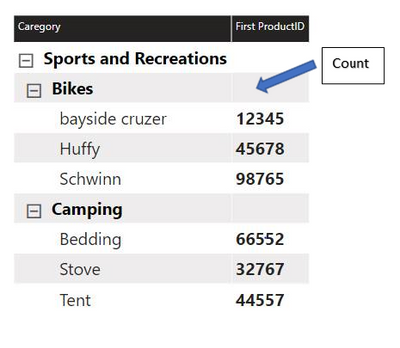
I have a question where I want to display ID and Count in a Matrix Column. The Count of Product need to be displayed at the upper level and the Product ID need to display at the lowest level.
At present, the PowerBI cannot display count and ProductID in the same column. I will be very grateful if any information or pointers with respect to this or display all the product id’s with comma separation in the parent hierarchy.
Following screen shot represents my requirement,
Solved! Go to Solution.
see attached for a sample implementation. Use HASONEVALUE or ISINSCOPE.
Thank you so much for providing me the solution. I will try your solution to my report. 🙂
The Power BI Data Visualization World Championships is back! It's time to submit your entry.
Check out the January 2026 Power BI update to learn about new features.
| User | Count |
|---|---|
| 3 | |
| 3 | |
| 2 | |
| 1 | |
| 1 |
| User | Count |
|---|---|
| 6 | |
| 3 | |
| 3 | |
| 2 | |
| 2 |