Join us at FabCon Atlanta from March 16 - 20, 2026, for the ultimate Fabric, Power BI, AI and SQL community-led event. Save $200 with code FABCOMM.
Register now!The Power BI Data Visualization World Championships is back! Get ahead of the game and start preparing now! Learn more
Hi,
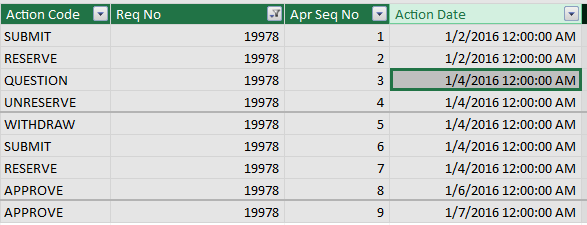
I have a financial approvals table that has the action date in the same column, I am trying to find out the lenght of time each the process is at each stage of the process. The table below is an exmpale of what I am working with. Any help would be greatly appreciated.
According to your description, you could add a calculated column as follows.
Duration Column =
DATEDIFF (
Table1[Action Date],
LOOKUPVALUE (
Table1[Action Date],
Table1[Req No], Table1[Req No],
Table1[Apr Seq No], Table1[Apr Seq No] + 1
),
HOUR
)
Hi Sam,
Thanks for your response. I seem to get an error when using the calculation, 'Calculation error I column 'PR Process'[]: In DATE DIFF function, the start date cannot be greater than the end date' I've not seen this error before, any ideas?
Cheers
Sam
For DATEDIFF Function, an error is returned if start_date is larger than end_date. To quickly resolve the issue, you may need to provide more information.
The Power BI Data Visualization World Championships is back! Get ahead of the game and start preparing now!
| User | Count |
|---|---|
| 9 | |
| 6 | |
| 4 | |
| 4 | |
| 3 |