cancel
Showing results for 
Search instead for 
Did you mean: 

The Power BI Data Visualization World Championships is back! Get ahead of the game and start preparing now! Learn more

Reply
MarkusEng1998
Resolver II
Resolver II

Data source authentication - two connectors

My data source authentication with the dRofus REST API is broken. This only occurs on a single PowerBI dashboard using this API. When I contacted the vendor, they suggested that it could be a conflict with another connector: Autodesk Construction Cloud.


The dRofus authentication broke after I added a new connection to the Autodesk Construction Cloud. Both dRofus data source and Autodesk use the same login. Is this the issue?


I am wondering if there's an error in using identical logins for different connectors?

Thank you for any suggestions.


1 ACCEPTED SOLUTION
Anonymous
Not applicable

Hi  @MarkusEng1998 ,


Ensure that both connectors are properly set up with login credentials such as username/password or any other authentication method.

Authentication issues may also be related to the way the token is refreshed. Make sure that the refresh mechanisms of both connectors do not interfere with each other.

Do you notice any specific error messages in Power BI when authentication fails in dRofus connector, if so, share them for further troubleshooting and we can help you better!

This is the related document, you can view this content:

How to Authenticate a REST API in Power BI? - Microsoft Fabric Community

Trusted Third-Party Connectors in Power BI Desktop - Power BI | Microsoft Learn


Best Regards,

Liu Yang

If this post helps, then please consider Accept it as the solution to help the other members find it more quickly.

View solution in original post

2 REPLIES 2
Anonymous
Not applicable

Hi  @MarkusEng1998 ,


Ensure that both connectors are properly set up with login credentials such as username/password or any other authentication method.

Authentication issues may also be related to the way the token is refreshed. Make sure that the refresh mechanisms of both connectors do not interfere with each other.

Do you notice any specific error messages in Power BI when authentication fails in dRofus connector, if so, share them for further troubleshooting and we can help you better!

This is the related document, you can view this content:

How to Authenticate a REST API in Power BI? - Microsoft Fabric Community

Trusted Third-Party Connectors in Power BI Desktop - Power BI | Microsoft Learn


Best Regards,

Liu Yang

If this post helps, then please consider Accept it as the solution to help the other members find it more quickly.

Thank you @Anonymous for your response.


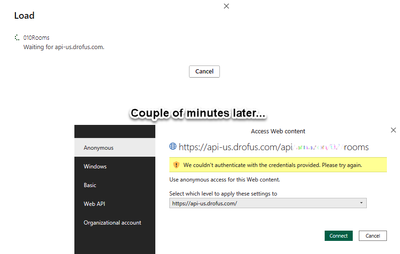
When I refresh the query with the dRofus API, the update window shows that PowerBI is waiting for the API.

After a couple of minutes (server timeout?) I get the can't authenticate message.

What is unusual is that I set up the data source with basic authentication, but the error returns as anonymous.

MarkusEng1998_0-1713369818601.png


Because this is the only dashboard that is having the authentication issue with the dRofus API, I am resigned on removing the dRofus API query, and replacing it with an Excel export from dRofus instead.


Thank you for your consideration.

Markus.


Helpful resources

Announcements
Power BI DataViz World Championships

Power BI Dataviz World Championships

The Power BI Data Visualization World Championships is back! Get ahead of the game and start preparing now!

December 2025 Power BI Update Carousel

Power BI Monthly Update - December 2025

Check out the December 2025 Power BI Holiday Recap!

FabCon Atlanta 2026 carousel

FabCon Atlanta 2026

Join us at FabCon Atlanta, March 16-20, for the ultimate Fabric, Power BI, AI and SQL community-led event. Save $200 with code FABCOMM.