Learn from the best! Meet the four finalists headed to the FINALS of the Power BI Dataviz World Championships! Register now
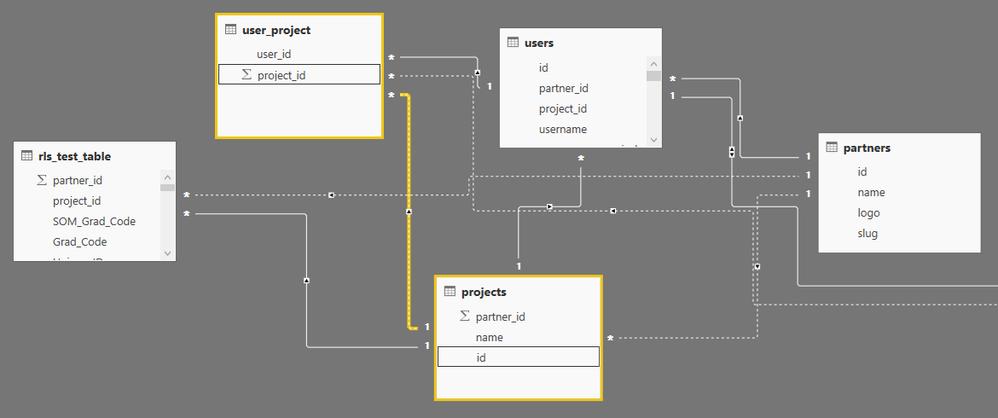
I have 5 tables. Below the attached screenshot with tables and fields.
I need to display the reports details based on the User project id and partner id.
Users have two roles 'Project Role' and 'Partner Role'. I have created two Roles in the Powerbi report. One is for Partner and another role Project.
Below the expression which is working in "import mode"
Partner Role:
'Partner' = [partner_id] IN SELECTCOLUMNS (FILTER ( 'users', 'users'[id] = VALUE(USERNAME()) ), "partners", [partner_id])
Project Role:
'Project' = [id] IN SELECTCOLUMNS (FILTER ( 'user_project', RELATED('users'[id]) = VALUE(USERNAME()) ), "projects", [project_id])
Now we are using Direct query. I have created Analysis Service and created model. How should I write DAX Expression in Direct query for above scenario?
Hi @rsathish_red,
Can you mark the proper answer as a solution please?
Best Regards,
Dale
Hi @rsathish_red,
It seems you added them in the tables as calculated columns. But the SSAS live mode doesn't support calculated columns. There could be two workarounds.
1. Add them in the SSAS;
2. Create a measure instead. Please give it a try.
Best Regards,
Dale
| User | Count |
|---|---|
| 3 | |
| 2 | |
| 2 | |
| 1 | |
| 1 |
| User | Count |
|---|---|
| 2 | |
| 2 | |
| 2 | |
| 2 | |
| 2 |