
Get certified for free when you join Fabric Data Days 2026 and dive into Fabric, Power BI, SQL, AI, and other essential data skills.
Join nowData Days is here! Join us now for 60+ days of learning, challenges, and connection. Learn more
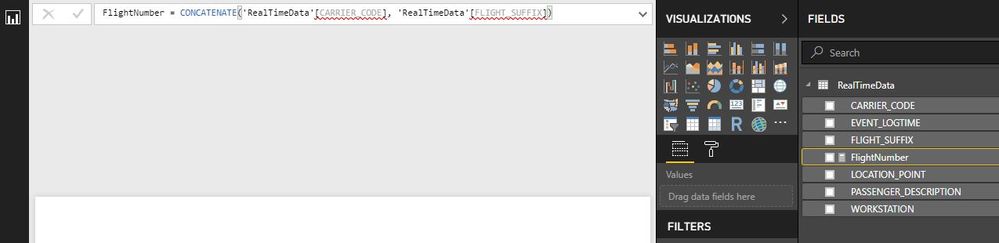
I've created a Push streaming dataset, and I'm trying to combine two of the columns (Strings) into a new measure. I've looked up the syntax which displays the following:
When I try it shows an error. This syntax works correctly when I'm connecting to a database, but shows an error with the streaming dataset. I'd say that it just wasnt possible to create a measure for a streaming dataset, but it gives you the option to create one, when it doesnt give you the option to create a custom column. Can anyone advise on what I can do?
Solved! Go to Solution.
Measures I found needed an aggregate applied to them.
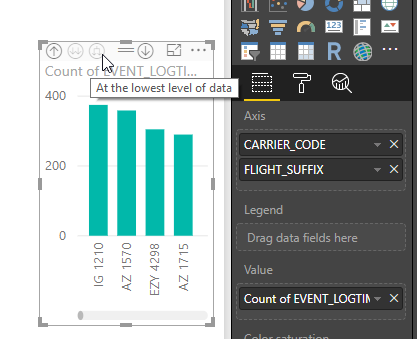
I wanted to combine the two strings so that both values would appear on the X-axis of a chart as I thought before it would only display one value or the other. This was resolved by selecting the view 'At Lowest Level of Data' as seen below. Thanks for the help.
Hi @flennon,
That's a common error in a measure. That's because a value of these column can't be determined. Please try it like below.
=concatenate(min('products'[Product abbreviation]), min('products'[Product number]))
Best Regards,
Dale
Thanks for the reply Dale.
I had copied the syntax from the MSDN Docs here
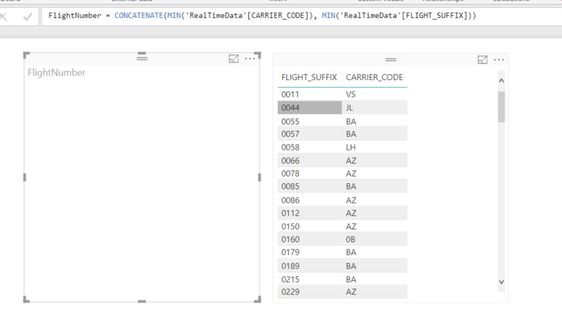
I attempted to add in the min() to the formula but the values I'm trying to concatenate are strings. It did not give a syntax error but the formula does not display any values as shown below. Any further advice would be greatly appreciated.
Hi @flennon,
How about adding the measure in the table, the right one in your snapshot? Or you can change the left visual into a Card visual. Your old formula can work in a calculated column that isn't supported in your scenario.
Best Regards,
Dale
Measures I found needed an aggregate applied to them.
I wanted to combine the two strings so that both values would appear on the X-axis of a chart as I thought before it would only display one value or the other. This was resolved by selecting the view 'At Lowest Level of Data' as seen below. Thanks for the help.
Don't miss out on Data Days, June 15 through August 7. Learn Fabric, Power BI, SQL, AI and more.
Check out the May 2026 Power BI update to learn about new features.
| User | Count |
|---|---|
| 2 | |
| 2 | |
| 1 | |
| 1 | |
| 1 |