Join us at FabCon Atlanta from March 16 - 20, 2026, for the ultimate Fabric, Power BI, AI and SQL community-led event. Save $200 with code FABCOMM.
Register now!The Power BI Data Visualization World Championships is back! Get ahead of the game and start preparing now! Learn more
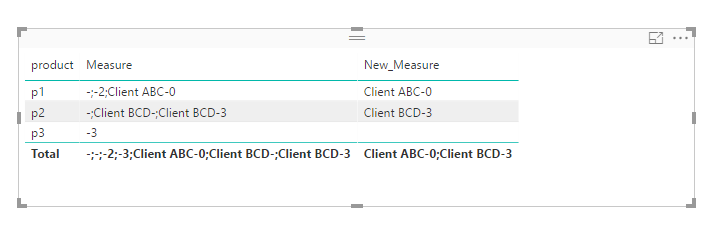
I have the following code that works (VAR X = CONCATENATEX(Table, Table[Column] & " - " & Table[Column], "; ", [Table Column], DESC) ---however sometimes my result looks like this:
Ex. 1: Client ABC - 0; -; or
Ex. 2: -;
Basically it tries to concatenate data from one column (description) based off of the id from another column (id) - but while it matches on the id the description column is blank... So I get the ugly -; without anything following it.. So how can I check first whether there's an actual value before attempting to concatenate.. I'm new to DAX so don't know the syntax at all.
Thanks,
I simply want to check if current row Table[Column] is blank, null, etc. before doing this step: Table[Column] & " - " & Table[Column], "; ", [Table Column].... Need syntax...
Solved! Go to Solution.
@arelf27 wrote:
I have the following code that works (VAR X = CONCATENATEX(Table, Table[Column] & " - " & Table[Column], "; ", [Table Column], DESC) ---however sometimes my result looks like this:
Ex. 1: Client ABC - 0; -; or
Ex. 2: -;
Basically it tries to concatenate data from one column (description) based off of the id from another column (id) - but while it matches on the id the description column is blank... So I get the ugly -; without anything following it.. So how can I check first whether there's an actual value before attempting to concatenate.. I'm new to DAX so don't know the syntax at all.
Thanks,
I simply want to check if current row Table[Column] is blank, null, etc. before doing this step: Table[Column] & " - " & Table[Column], "; ", [Table Column].... Need syntax...
Try to apply a filter to the table.
New_Measure =
CONCATENATEX (
FILTER ( 'Table', 'Table'[description] <> BLANK () && 'Table'[id] <> BLANK () ),
'Table'[description] & "-"
& 'Table'[id],
";",
'Table'[description], ASC
)
@arelf27 wrote:
I have the following code that works (VAR X = CONCATENATEX(Table, Table[Column] & " - " & Table[Column], "; ", [Table Column], DESC) ---however sometimes my result looks like this:
Ex. 1: Client ABC - 0; -; or
Ex. 2: -;
Basically it tries to concatenate data from one column (description) based off of the id from another column (id) - but while it matches on the id the description column is blank... So I get the ugly -; without anything following it.. So how can I check first whether there's an actual value before attempting to concatenate.. I'm new to DAX so don't know the syntax at all.
Thanks,
I simply want to check if current row Table[Column] is blank, null, etc. before doing this step: Table[Column] & " - " & Table[Column], "; ", [Table Column].... Need syntax...
Try to apply a filter to the table.
New_Measure =
CONCATENATEX (
FILTER ( 'Table', 'Table'[description] <> BLANK () && 'Table'[id] <> BLANK () ),
'Table'[description] & "-"
& 'Table'[id],
";",
'Table'[description], ASC
)
Thanks, this is exactly what I needed.
Thanks using Filter did the trick!
The Power BI Data Visualization World Championships is back! Get ahead of the game and start preparing now!
| User | Count |
|---|---|
| 4 | |
| 3 | |
| 2 | |
| 1 | |
| 1 |
| User | Count |
|---|---|
| 11 | |
| 8 | |
| 4 | |
| 3 | |
| 3 |