cancel
Showing results for 
Search instead for 
Did you mean: 

Vote for your favorite vizzies from the Power BI Dataviz World Championship submissions. Vote now!

Reply
satishr
Helper III
Helper III

Custom visual - tables with tabs

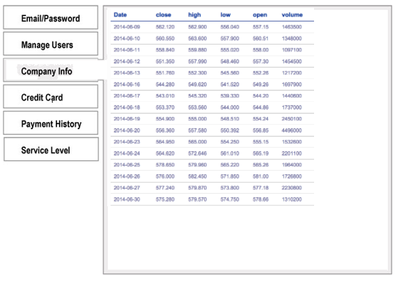
I have a requirement to create a custom visual where I have to create a tabbed interface each containing tables something similar to the image. Please help me with any code examples. I'm trying to create a table using D3 but facing some issues. I saw few examples in jQuery for creating tabs. I'm not sure how to use jQuery in custom visual code.


Untitled.png

1 ACCEPTED SOLUTION
v-viig
Community Champion
Community Champion

That depends on what library you use. The common way is to add an event handler for click event:

  • Vanila JS: element.addEventListener("click", () => {// TODO: Do something });
  • D3.js / jQuery: selection.on("click", () => {// TODO: Do something })


Ignat Vilesov,

Software Engineer


Microsoft Power BI Custom Visuals

pbicvsupport@microsoft.com


View solution in original post

6 REPLIES 6
Anonymous
Not applicable

Another option is to use book marks to show/hide the visuals.  Each visual can have filters applied to it.

Here are the steps:
https://www.aerieconsulting.com/blog/how-to-hide-and-show-visuals-in-power-bi


Perfect, thanks' this link was really useful for me. 🙏

v-viig
Community Champion
Community Champion

Is changing tabs going to filter data? If so, you might use table + slicer to reach the same behavior.

If you want to build the visual from scratch you should take a look at D3.js gallery for more examples.


Ignat Vilesov,

Software Engineer


Microsoft Power BI Custom Visuals

pbicvsupport@microsoft.com

@v-viig Couldn't get anything from the D3 gallery. My requirement is very simple. There are four tabs. The data should be split into four tables based on a logic and should be displayed one in each tab. I'm trying to implement https://www.w3schools.com/howto/howto_js_vertical_tabs.asp but couldn't do it. I know it is very simple but I'm new to Typescript and custom visual coding. I implemented the HTML and the CSS part from the above link. There is a line which says onclick="openCity(event, 'London')" in the HTML. How to do this in typescript?

v-viig
Community Champion
Community Champion

That depends on what library you use. The common way is to add an event handler for click event:

  • Vanila JS: element.addEventListener("click", () => {// TODO: Do something });
  • D3.js / jQuery: selection.on("click", () => {// TODO: Do something })


Ignat Vilesov,

Software Engineer


Microsoft Power BI Custom Visuals

pbicvsupport@microsoft.com


Thanks, I used the D3 option and it is working.

d3.select("#id").on('click', function() { ... }

Helpful resources

Announcements
Power BI DataViz World Championships

Power BI Dataviz World Championships

Vote for your favorite vizzies from the Power BI World Championship submissions!

Sticker Challenge 2026 Carousel

Join our Community Sticker Challenge 2026

If you love stickers, then you will definitely want to check out our Community Sticker Challenge!

January Power BI Update Carousel

Power BI Monthly Update - January 2026

Check out the January 2026 Power BI update to learn about new features.

FabCon Atlanta 2026 carousel

FabCon Atlanta 2026

Join us at FabCon Atlanta, March 16-20, for the ultimate Fabric, Power BI, AI and SQL community-led event. Save $200 with code FABCOMM.